Snipaste 2.10.8 is the latest version of the popular screen capture and annotation software for Windows. Known for its simplicity, efficiency, and powerful features, Snipaste helps users take, edit, and manage screenshots with ease. Whether you’re a developer, designer, or everyday user, Snipaste is designed to boost productivity.
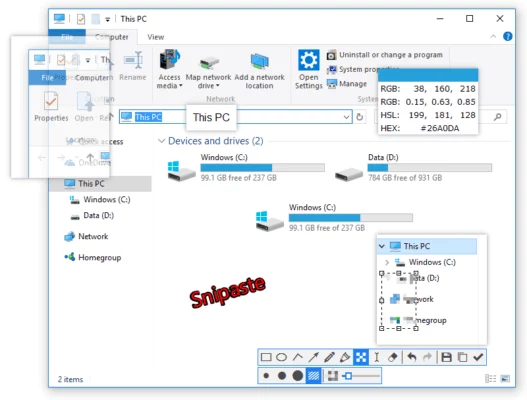
Key Features of Snipaste 2.10.8
1. Flexible Screen Capture
Capture any part of your screen with pixel-level accuracy. The software supports custom dimensions, full screen, and window-specific captures.
2. Built-in Annotation Tools
Annotate screenshots instantly with arrows, shapes, text, and markers to highlight key details.
3. Pin to Screen
Snipaste’s unique feature allows users to pin images directly onto the desktop, making it easy to reference or compare data.
4. Clipboard Integration
Paste images and text from your clipboard directly into Snipaste for quick editing and screen overlay.
5. Customization
Assign hotkeys for instant screen captures and tailor settings to match your workflow.
6. Lightweight & Portable
With a small footprint, Snipaste runs smoothly without affecting system performance.
7. What’s New in Version 2.10.8
- Bug fixes for more stable performance.
- Enhanced hotkey responsiveness.
- Improved annotation tool handling.
Benefits of Using Snipaste
- Productivity: Capture and edit screenshots faster than traditional tools.
- Communication: Create clear, annotated visuals for tutorials, presentations, or technical support.
- Convenience: Pin screenshots directly to your screen for real-time referencing.
- Portability: No installation required, making it perfect for on-the-go users.
System Requirements
- OS: Windows 7/8/10/11 (32-bit & 64-bit)
- CPU: 1 GHz or faster
- RAM: 1 GB minimum
- Disk Space: 50 MB free
Final Verdict
Snipaste 2.10.8 is a must-have tool for anyone who frequently works with screenshots. Its intuitive interface, unique pin-to-screen function, and powerful annotation tools make it stand out from other screen capture utilities.
If you’re looking for a lightweight, portable, and feature-rich solution, Snipaste 2.10.8 is one of the best options available.
✔ Tested: This software was tested on Windows 10 & Windows 11 and works smoothly without issues.
Frequently Asked Questions
- Is this software free?
Yes, it can be downloaded and used for free. - Does it support Windows 11?
Yes, it works perfectly on Windows 10 and 11. - Is it safe to use?
Yes, the software was scanned and tested before publishing.
Last updated: January 2026