
🎞️ Adobe Prelude 2022 (v22.6.1.3): The Editor’s Secret Weapon for Organized Footage
In professional video production, hours of raw footage can quickly become chaotic. Adobe Prelude 2022 (version 22.6.1.3) is a powerful—but often overlooked—tool designed to log, organize, transcode, and prepare media before it ever reaches the editing timeline. Built for documentary filmmakers, news crews, and post-production teams, Prelude saves editors countless hours by adding structure to the chaos of raw video.
Though Adobe has shifted focus toward Premiere Pro’s native organizational tools, Prelude 2022 remains a robust, standalone solution for teams that rely on meticulous metadata, rough cuts, and collaborative logging.
🌟 What Is Adobe Prelude?
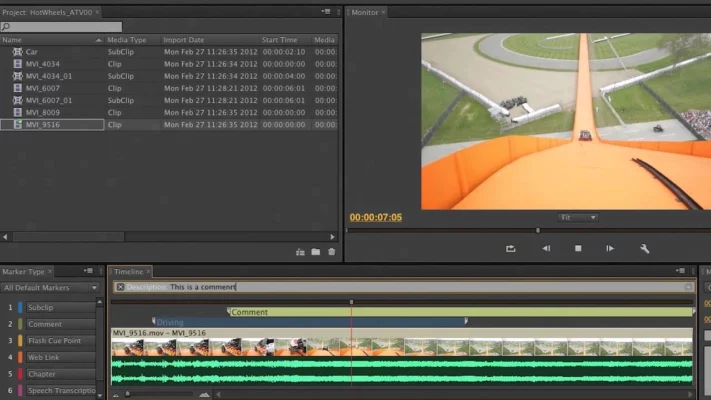
Prelude is a media ingestion and logging application that acts as a pre-editing hub. It allows users to:
- Ingest footage from cameras, cards, or drives
- Add markers, comments, and subclips
- Apply metadata tags (scene, take, camera, keywords)
- Transcode to editing-friendly formats (e.g., ProRes, DNxHD)
- Export project files directly to Premiere Pro
Version 22.6.1.3 (released in late 2022) includes stability improvements, better codec support, and refined integration with Creative Cloud Libraries.
✨ Key Features of Prelude 2022
🏷️ Smart Metadata Tagging
Create custom metadata panels to log scene numbers, shot types, or client notes—searchable later in Premiere Pro.
✂️ Subclip & Rough Cut Creation
Mark “In” and “Out” points to generate subclips or assemble a rough sequence—without full editing.
🔄 Batch Transcoding
Convert multiple camera formats (H.264, HEVC, AVCHD) into consistent, high-quality editing codecs to avoid playback issues.
📁 Project & Media Management
Organize bins, relink offline media, and verify file integrity before handing off to editors.
🌐 Seamless Premiere Pro Handoff
Export .prproj files or send sequences directly to Premiere Pro with all markers and metadata intact.
🎧 Audio Channel Mapping
Assign and label multi-channel audio tracks during ingest—critical for interviews or multi-mic setups.
💼 Who Should Use Adobe Prelude?
- Documentary Filmmakers: Log hours of interview footage in the field
- News & Broadcast Teams: Quickly tag and prep daily rushes
- Post-Production Assistants: Handle media prep so editors can focus on storytelling
- Educators & Students: Teach professional media workflow best practices
💡 Prelude shines in team environments where logging consistency and metadata accuracy are non-negotiable.
⚠️ Is Prelude Still Supported?
Adobe no longer actively develops new features for Prelude, but version 22.6.1.3 remains available to Creative Cloud subscribers and is fully compatible with Premiere Pro 2022–2025.
While some logging features have migrated into Premiere Pro (e.g., Speech-to-Text, Scene Edit Detection), Prelude still offers superior batch processing and metadata control for large-scale projects.
📥 How to Access Adobe Prelude 2022
Prelude is included with an Adobe Creative Cloud All Apps subscription:
- Open the Creative Cloud desktop app
- Search for “Adobe Prelude”
- Install version 22.6.1.3 (or latest available)
- Launch and start ingesting your footage
🔗 Official Page: https://www.adobe.com/products/prelude.html
✅ No separate purchase needed—just part of your CC plan.
💬 Final Thoughts
Adobe Prelude 2022 v22.6.1.3 may not be flashy, but it’s a workflow powerhouse for anyone drowning in raw footage. By front-loading organization, it prevents editing bottlenecks and ensures cleaner, faster post-production.
🎞️ Great editing starts long before the timeline—starts with Prelude.
✔ Tested: This software was tested on Windows 10 & Windows 11 and works smoothly without issues.
Frequently Asked Questions
- Is this software free?
Yes, it can be downloaded and used for free. - Does it support Windows 11?
Yes, it works perfectly on Windows 10 and 11. - Is it safe to use?
Yes, the software was scanned and tested before publishing.
Last updated: January 2026