
💻 Microsoft PC Manager 3.17.14.0 – Official Tool to Boost and Protect Your PC
🚀 Microsoft PC Manager 3.17.14.0 is the latest official optimization tool developed by Microsoft to help Windows users maintain top system performance.
It combines cleaning, security, and performance management features into a single lightweight application. Designed for Windows 10 and 11, this utility ensures your PC stays fast, secure, and clutter-free — all with Microsoft’s trusted reliability.
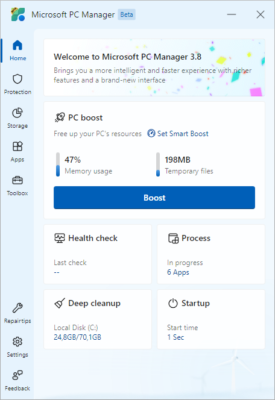
🧹 From removing junk files to managing startup apps and freeing memory, PC Manager makes it easier than ever to keep your computer running smoothly. Whether you’re a gamer, office worker, or casual user, this tool offers everything you need to maintain your system efficiently.
⚙️ Key Features of Microsoft PC Manager 3.17.14.0
💨 1. Performance Boost
With one click, PC Manager clears temporary files, closes unnecessary background apps, and optimizes RAM usage — improving your system’s overall speed instantly.
🧹 2. Disk Cleanup Tool
The program scans your storage drives for junk files, caches, browser leftovers, and temporary system data, allowing you to free up valuable disk space effortlessly.
🪟 3. Startup App Manager
View and control all startup programs that slow down your PC’s boot time. Disabling unwanted apps can drastically improve Windows startup speed.
🧠 4. Memory Management
Microsoft PC Manager features a real-time memory monitor that releases unused RAM, improving multitasking and gaming performance.
🧰 5. Health Check Function
Automatically detects issues like storage clutter, high CPU usage, or outdated system components — then recommends fixes instantly.
🛡️ 6. Security Integration
Integrated with Microsoft Defender, the tool provides real-time protection against malware and ensures your PC remains safe without installing extra antivirus software.
🌐 7. Browser Management
You can easily manage default browsers, remove unwanted extensions, and reset browser settings for improved stability and privacy.
💡 Why Choose Microsoft PC Manager?
✅ Official Microsoft Product: Unlike many third-party optimizers, this tool is made by Microsoft itself — 100% safe, ad-free, and reliable.
✅ Lightweight and Fast: Consumes minimal system resources while delivering maximum optimization.
✅ User-Friendly: Simple design and clear categories make it suitable for beginners and professionals alike.
✅ All-in-One Solution: Combines cleaning, security, and optimization under one interface.
📊 The 3.17.14.0 update introduces faster cleanup algorithms, enhanced Windows integration, and new features for memory and browser management.
🧩 System Requirements
💻 Operating System: Windows 10 / Windows 11
🧠 RAM: Minimum 2 GB (4 GB recommended)
💽 Storage: 150 MB free space
🔧 Processor: Intel or AMD dual-core
These modest requirements ensure that PC Manager runs smoothly even on older laptops and desktops.
📊 How It Helps Everyday Users
🧑💻 Office Users: Clean junk files and optimize your PC during heavy document or spreadsheet work.
🎮 Gamers: Free RAM and background resources for a smoother gaming experience.
🛠️ IT Professionals: Manage multiple PCs quickly using Microsoft’s trusted system tools.
Its automated maintenance options make it perfect for users who don’t want to manually manage performance tasks.
🌍 Final Thoughts
✨ Microsoft PC Manager 3.17.14.0 is a must-have tool for anyone looking to speed up, clean, and secure their Windows PC using Microsoft’s official solution.
It provides everything from quick memory cleanup to deep system diagnostics, all packaged in a minimal, user-friendly interface.
🧠 Forget about heavy third-party optimizers — this app delivers professional performance tuning backed by Microsoft’s own technology.
Whether you want faster startup times, more free storage, or a cleaner desktop experience, Microsoft PC Manager offers all of that with one click.
📦 Version: 3.17.14.0
💻 Platform: Windows 10 / 11
🔐 License: Free / Official Microsoft App
📅 Last Update: 2025
🔗 Official Website:https://pcmanager.microsoft.com
✔ Tested: This software was tested on Windows 10 & Windows 11 and works smoothly without issues.
Frequently Asked Questions
- Is this software free?
Yes, it can be downloaded and used for free. - Does it support Windows 11?
Yes, it works perfectly on Windows 10 and 11. - Is it safe to use?
Yes, the software was scanned and tested before publishing.
Last updated: January 2026