Display calibration is essential for gamers, designers, and everyday users who want to optimize their screen for better colors, contrast, and brightness. Gamma Panel 1.0.0.20 is a lightweight Windows utility that allows you to instantly adjust gamma, brightness, and contrast with just a few clicks.
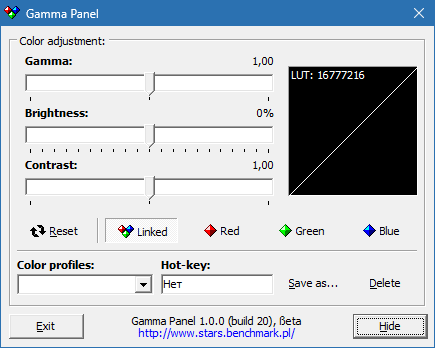
Unlike bulky calibration software, Gamma Panel is designed to be fast, portable, and easy to use, making it the perfect tool for anyone who wants full control over their screen settings.
🔧 Why Choose Gamma Panel?
Monitors often come with built-in settings, but navigating through on-screen menus can be slow and inconvenient. Gamma Panel 1.0.0.20 provides a quick, software-based solution to adjust your display in real time without needing to touch your monitor buttons.
✨ Key Features of Gamma Panel 1.0.0.20
1. Real-Time Adjustments
Instantly modify gamma, brightness, and contrast.
Preview changes immediately without restarting applications.
2. Hotkey Support
Assign custom shortcuts for quick display adjustments.
Perfect for switching profiles while gaming or working.
3. Lightweight Utility
Runs in the background with minimal CPU and memory usage.
Portable version available—no installation required.
4. Multi-Profile Support
Create and save different profiles for gaming, movies, or reading.
Switch between them instantly based on your needs.
5. Eye Comfort Enhancement
Reduce screen glare during night use.
Improve visibility in dark or overly bright environments.
📌 What’s New in Version 1.0.0.20?
Improved compatibility with newer versions of Windows.
Bug fixes for profile saving and hotkey functions.
Optimized performance for multi-monitor setups.
💻 System Requirements
OS: Windows XP, Vista, 7, 8, 10, 11
Processor: 1 GHz or faster
RAM: 1 GB minimum
Disk Space: 20 MB free storage
👥 Who Should Use Gamma Panel?
Gamers 🎮 – Adjust display settings for better visibility in dark game scenes.
Graphic Designers 🎨 – Fine-tune colors for accurate visuals.
Movie Watchers 🎬 – Optimize brightness and contrast for cinematic experience.
General Users 👓 – Reduce eye strain during long computer sessions.
✅ Final Verdict
Gamma Panel 1.0.0.20 is a small but powerful utility that gives users full control over their screen display settings. Whether you need sharper colors for design, clearer visuals for gaming, or softer tones for late-night browsing, Gamma Panel delivers instant results.
For users seeking an easy-to-use and efficient display tuner, Gamma Panel remains a highly recommended tool.
✔ Tested: This software was tested on Windows 10 & Windows 11 and works smoothly without issues.
Frequently Asked Questions
- Is this software free?
Yes, it can be downloaded and used for free. - Does it support Windows 11?
Yes, it works perfectly on Windows 10 and 11. - Is it safe to use?
Yes, the software was scanned and tested before publishing.
Last updated: January 2026