
For gamers and PC enthusiasts, getting the best performance out of hardware is always a priority. Graphics cards, in particular, play a central role in gaming, rendering, and video editing. MSI Afterburner 4.6.6 is one of the most trusted and widely used GPU overclocking utilities. Known for its reliability and advanced features, it enables users to tweak performance settings, monitor hardware in real-time, and optimize cooling for maximum efficiency.
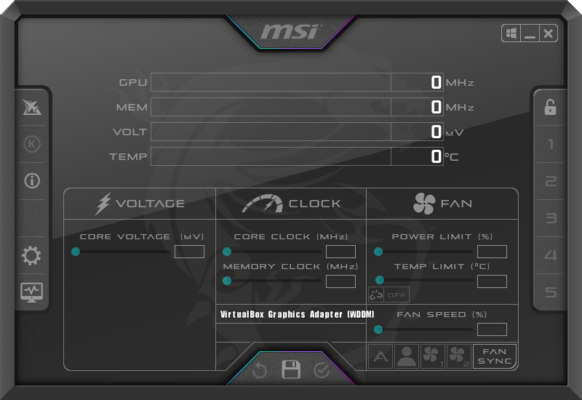
What is MSI Afterburner 4.6.6?
MSI Afterburner is a free GPU overclocking and monitoring software developed by MSI, one of the leading gaming hardware manufacturers. With version 4.6.6, the software offers full support for the latest NVIDIA and AMD graphics cards, improved hardware monitoring, and enhanced stability. Its user-friendly interface makes it suitable for both beginners and experienced overclockers.
Key Features of MSI Afterburner 4.6.6
GPU Overclocking: Increase core clock, memory clock, and voltage to maximize performance.
Custom Fan Profiles: Control cooling manually or set automatic fan speed curves.
Real-Time Hardware Monitoring: Track GPU temperature, usage, clock speeds, and voltages.
On-Screen Display (OSD): View critical hardware stats while gaming.
Benchmarking Tools: Use MSI Kombustor for stress testing and performance benchmarking.
Video Capture: Built-in screen recording with minimal performance impact.
Wide Compatibility: Supports NVIDIA and AMD GPUs across different generations.
Free to Use: Unlike many alternatives, MSI Afterburner is completely free.
System Requirements
MSI Afterburner 4.6.6 is lightweight but requires compatible hardware:
OS: Windows 7, 8, 10, 11 (32-bit and 64-bit)
Processor: Intel/AMD CPU, 1 GHz or faster
RAM: 1 GB minimum
Graphics Card: NVIDIA GeForce or AMD Radeon with driver support
Storage: 50 MB free disk space
How to Download and Install MSI Afterburner 4.6.6
Visit the official MSI Afterburner website.
Download the installer for version 4.6.6.
Run the setup file and follow the instructions.
Launch the program after installation.
Adjust GPU clock, memory, and fan settings as desired.
Use the monitoring panel to keep track of hardware performance.
Why Use MSI Afterburner 4.6.6?
MSI Afterburner is popular because it combines powerful features with simplicity. Gamers can push their graphics card to achieve higher frame rates, while professionals benefit from stability and monitoring tools during heavy workloads. The inclusion of screen recording and benchmarking makes it a multi-purpose utility. Compared to paid alternatives, MSI Afterburner remains one of the most reliable free solutions.
Conclusion
MSI Afterburner 4.6.6 continues the legacy of being the most trusted GPU overclocking tool worldwide. With its robust set of features, real-time monitoring, and ease of use, it offers both casual gamers and professional users complete control over their graphics card performance. Whether you want to overclock, optimize cooling, or simply monitor hardware health, MSI Afterburner 4.6.6 is the perfect choice. Download it today and unlock the full potential of your GPU.
✔ Tested: This software was tested on Windows 10 & Windows 11 and works smoothly without issues.
Frequently Asked Questions
- Is this software free?
Yes, it can be downloaded and used for free. - Does it support Windows 11?
Yes, it works perfectly on Windows 10 and 11. - Is it safe to use?
Yes, the software was scanned and tested before publishing.
Last updated: January 2026