🔍 Introduction: What is MSI App Player 4.280.1.4309?
If you’re looking to run Android apps or play mobile games on your Windows PC, MSI App Player 4.280.1.4309 offers a fast, stable, and user-friendly solution.
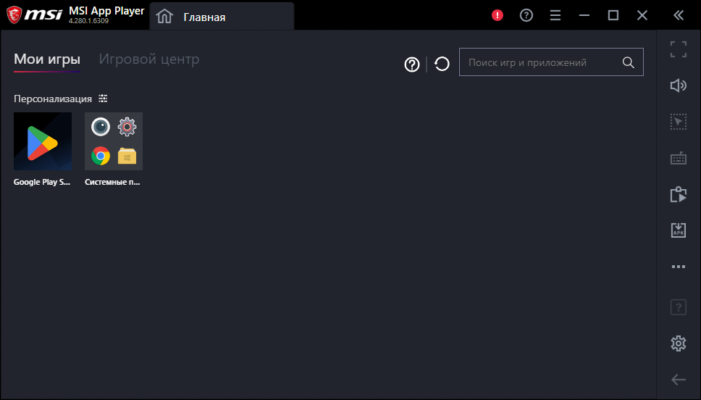
Developed by MSI , this Android emulator is optimized for performance on gaming laptops and desktops, especially those powered by MSI hardware. Whether you’re a gamer wanting to enjoy titles like PUBG Mobile or Genshin Impact with better controls, or a productivity user who needs to run Android apps alongside Windows software — MSI App Player 4.280.1.4309 makes it possible.
With support for high FPS, keyboard/mouse mapping, multi-instance mode, and seamless integration with Google Play Services, this emulator delivers a top-tier Android experience on Windows and see MSI Super Charger .
⚙️ Key Features of MSI App Player 4.280.1.4309
📱 Android App & Game Support
Run any Android app or game directly on your PC using the latest Android engine.
🎮 Optimized for Gaming
Designed specifically for gamers, offering smooth gameplay at high frame rates and low latency.
⌨ Keyboard & Mouse Mapping
Customize controls with full support for mouse and keyboard input — giving you an edge in competitive mobile games.
💻 Multi-Instance Support
Run multiple Android apps or games simultaneously using separate windows — perfect for multitasking or farming in-game resources.
🔧 Easy Installation & Setup
No complicated configuration needed. Just install and start using your favorite Android apps in seconds.
🖥 Lightweight Performance
Built for efficiency, MSI App Player runs smoothly even on mid-range PCs without heavy resource usage.
🌐 Google Play Store Integration
Access millions of apps and games from the Google Play Store right inside the emulator.
💡 Why Use MSI App Player 4.280.1.4309?
Whether you’re a casual user or a serious gamer, MSI App Player 4.280.1.4309 brings real value by bridging the gap between mobile and desktop computing.
It’s especially useful for:
- Gamers : Wanting to play mobile games with better control and screen size.
- Streamers : Looking to broadcast Android gameplay with ease.
- Productivity Users : Running messaging apps like WhatsApp or TikTok alongside desktop tools.
- Developers & Testers : Testing Android apps on a Windows environment.
Unlike many other emulators, MSI App Player is lightweight, secure, and developed by a trusted brand in PC hardware.
▶️ Watch How It Works
📌 Conclusion: A Top Emulator for Android on Windows
For anyone looking to bring Android apps and games to their Windows PC, MSI App Player 4.280.1.4309 is a reliable and high-performance option.
Its combination of speed, stability, and customization makes it stand out among Android emulators — especially for gamers and multitaskers.
Download MSI App Player 4.280.1.4309 today and take your Android experience to the next level — on your PC.
✔ Tested: This software was tested on Windows 10 & Windows 11 and works smoothly without issues.
Frequently Asked Questions
- Is this software free?
Yes, it can be downloaded and used for free. - Does it support Windows 11?
Yes, it works perfectly on Windows 10 and 11. - Is it safe to use?
Yes, the software was scanned and tested before publishing.
Last updated: January 2026