Managing scanned documents efficiently is crucial for both home and office users. Canon, a global leader in imaging solutions, provides dedicated software for its multifunction printers and scanners to simplify the process. Canon MF Toolbox 4.9.1.1 is one of the most popular utilities developed by Canon to help users scan, save, and manage documents with ease. It integrates seamlessly with Canon devices and ensures a smooth workflow for all your scanning needs.
What is Canon MF Toolbox 4.9.1.1?
Canon MF Toolbox is a utility program that comes with Canon multifunction (MF) printers and scanners. The version 4.9.1.1 is designed to improve compatibility with newer Windows operating systems and provides a stable environment for document handling. With this software, you can scan documents directly to PDF, email, or OCR applications, making it versatile for both personal and professional use.
Key Features of Canon MF Toolbox 4.9.1.1
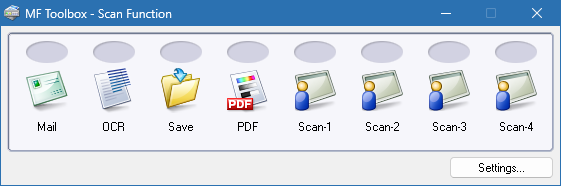
Scan to PDF: Convert paper documents into searchable PDF files.
Scan to Email: Send scanned documents directly via email.
OCR Integration: Recognize text from scanned images for editing in word processors.
Simple Interface: Easy-to-use buttons for different scanning modes.
Compatibility: Works with a wide range of Canon MF series printers and scanners.
Custom Profiles: Save frequently used scan settings for faster workflows.
Document Management: Organize scanned files into folders automatically.
System Requirements
Canon MF Toolbox 4.9.1.1 is lightweight but requires a Canon-compatible device to function properly.
Operating System: Windows XP, Vista, 7, 8, 10, or 11 (32-bit and 64-bit)
Processor: Intel/AMD CPU, 1 GHz or faster
RAM: 1 GB minimum, 2 GB recommended
Storage: 100 MB free disk space
Hardware: Canon multifunction printer/scanner
How to Download and Install Canon MF Toolbox 4.9.1.1
Visit the official Canon support website.
Search for your Canon MF series device model.
Navigate to the drivers and downloads section.
Locate MF Toolbox 4.9.1.1 and download the installer.
Run the setup file and follow the on-screen instructions.
Restart your computer and connect your Canon device.
Launch the MF Toolbox software and begin scanning.
Why Use Canon MF Toolbox 4.9.1.1?
While Windows includes basic scanning utilities, Canon MF Toolbox offers more advanced features tailored specifically for Canon devices. It enhances productivity by integrating scanning directly with email, OCR, and document workflows. For offices handling a large number of documents, the ability to scan directly into searchable PDFs is a significant advantage. Moreover, the program ensures full compatibility and stability with Canon hardware, something generic solutions cannot always guarantee.
Conclusion
Canon MF Toolbox 4.9.1.1 is an essential utility for Canon multifunction printer and scanner users. With its easy-to-use interface, advanced scanning features, and seamless integration with Canon hardware, it simplifies document management for both home and office environments. Whether you need to scan to PDF, email, or OCR, this software provides the tools to handle your documents efficiently. Download Canon MF Toolbox 4.9.1.1 today and take full control of your scanning workflow.
✔ Tested: This software was tested on Windows 10 & Windows 11 and works smoothly without issues.
Frequently Asked Questions
- Is this software free?
Yes, it can be downloaded and used for free. - Does it support Windows 11?
Yes, it works perfectly on Windows 10 and 11. - Is it safe to use?
Yes, the software was scanned and tested before publishing.
Last updated: January 2026