
Modern vehicles rely heavily on electronic systems, making diagnostic tools essential for identifying issues and maintaining performance. While many professional diagnostic programs are expensive, there are free and open-source alternatives that provide reliable results. OpenDiag 1.4 is one such solution, offering Windows users the ability to monitor and analyze vehicle data through onboard diagnostic interfaces.
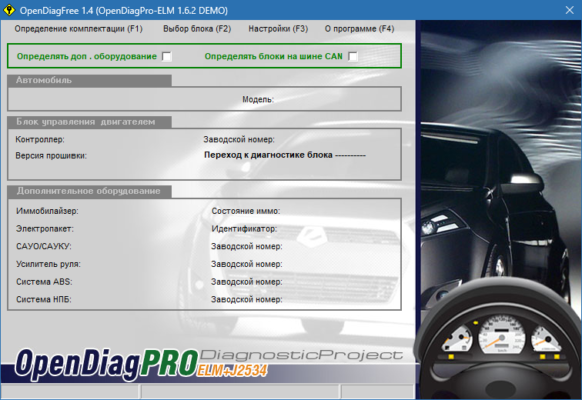
What is OpenDiag 1.4?
OpenDiag 1.4 is a free vehicle diagnostics program designed to work with OBD (On-Board Diagnostics) interfaces. It allows car owners, mechanics, and enthusiasts to read error codes, analyze engine data, and view real-time performance metrics. The software is lightweight, easy to use, and compatible with many popular OBD adapters, making it a practical choice for personal and professional use.
Key Features of OpenDiag 1.4
Fault Code Reading: Identify engine errors quickly with detailed diagnostic trouble codes (DTCs).
Real-Time Data Monitoring: View live parameters such as RPM, fuel consumption, and temperature.
Compatibility with OBD Adapters: Supports a wide range of OBD-II compatible devices.
Data Logging: Save diagnostic data for later review and analysis.
Lightweight and Free: Runs on basic Windows systems without heavy resources.
User-Friendly Interface: Simple design makes it accessible even for beginners.
Customizable Options: Adjust settings for specific car models and adapters.
System Requirements
OpenDiag 1.4 is designed to run on most Windows computers without requiring high specifications.
Operating System: Windows XP, 7, 8, 10, or 11
Processor: Intel/AMD CPU, 1 GHz or faster
RAM: 2 GB minimum
Storage: 50 MB free disk space
Hardware: OBD-II adapter (USB, Bluetooth, or Wi-Fi)
How to Download and Install OpenDiag 1.4
Visit the official OpenDiag website or a trusted software repository.
Download the installer for OpenDiag 1.4.
Connect your OBD-II adapter to the vehicle and your PC.
Run the installation file and follow the setup instructions.
Launch OpenDiag 1.4 and configure it to work with your adapter.
Start reading diagnostic codes or monitoring live engine data.
Why Use OpenDiag 1.4?
OpenDiag 1.4 is especially useful for car owners who want to monitor their vehicles without paying for expensive dealer diagnostics. It helps identify potential issues before they become major problems, saving time and money on repairs. For mechanics, it provides a reliable, cost-effective tool for diagnostics. Car enthusiasts also benefit from real-time monitoring, which can improve performance tuning and maintenance.
Conclusion
OpenDiag 1.4 is a practical and free diagnostic tool for anyone who needs to monitor and analyze vehicle performance. With support for OBD-II adapters, fault code reading, and real-time data monitoring, it offers valuable functionality in a lightweight package. Whether you are a mechanic, an enthusiast, or just a car owner who wants to understand their vehicle better, OpenDiag 1.4 is a reliable choice. Download it today and take control of your car’s diagnostics.
✔ Tested: This software was tested on Windows 10 & Windows 11 and works smoothly without issues.
Frequently Asked Questions
- Is this software free?
Yes, it can be downloaded and used for free. - Does it support Windows 11?
Yes, it works perfectly on Windows 10 and 11. - Is it safe to use?
Yes, the software was scanned and tested before publishing.
Last updated: January 2026