
Over time, every computer collects duplicate files that waste valuable storage space and make file management more difficult. Whether they are multiple copies of documents, photos, or videos, duplicates can slow down your workflow and clutter your system. CloneSpy 3.43 is a lightweight and free tool for Windows designed to solve this problem. It scans your hard drives, detects duplicate or similar files, and gives you options to delete or organize them easily.
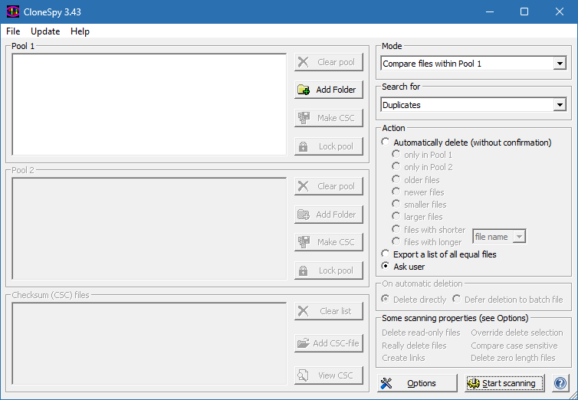
What is CloneSpy 3.43?
CloneSpy is a utility that specializes in finding duplicate files on Windows systems. Version 3.43 continues to improve accuracy and scanning performance, making it easier for users to maintain a clean and organized computer. Unlike basic disk cleanup tools, CloneSpy can also identify files with the same name, the same content, or even zero-byte files that serve no purpose.
Key Features of CloneSpy 3.43
Duplicate Detection: Finds files with identical content, even if they have different names.
Similar File Matching: Detects files with the same name or similar sizes.
Zero-byte File Detection: Identifies empty files that can be safely deleted.
Customizable Scans: Users can scan entire drives, specific folders, or external storage devices.
Flexible Deletion Options: Automatically delete duplicates or move them to a different location for review.
Reporting and Logs: Provides detailed reports of duplicate findings for better management.
Portable Tool: Lightweight and can run without complex installation.
System Requirements
CloneSpy 3.43 is designed to run smoothly on most Windows systems without requiring heavy resources.
Operating System: Windows 7, 8, 10, or 11
Processor: Intel/AMD CPU, 1 GHz or faster
RAM: 2 GB minimum
Storage: 20 MB free disk space
Additional: External drives supported for duplicate scanning
How to Download and Install CloneSpy 3.43
Visit the official CloneSpy website or trusted software repositories.
Download the CloneSpy 3.43 installer (or portable version).
Run the installer and follow the on-screen instructions.
Open the program and choose the folders or drives you want to scan.
Review the results and select whether to delete, move, or ignore duplicate files.
Why Use CloneSpy 3.43?
Managing disk space is critical, especially for users who work with large amounts of data such as photographers, designers, and office workers. Instead of manually searching for duplicates, CloneSpy does the hard work automatically. By removing unnecessary copies, you can free up gigabytes of storage and improve system performance. The software is also trusted for its accuracy and flexibility, making it more reliable than many generic cleanup tools.
Conclusion
CloneSpy 3.43 is a simple yet powerful tool for anyone who wants to clean their Windows PC from duplicate files. With its advanced scanning options, detailed reports, and user-friendly controls, it helps you reclaim valuable storage space and keep your system organized. Best of all, it is completely free and lightweight, making it accessible to everyone. Download CloneSpy 3.43 today and enjoy a cleaner, faster, and more efficient computer.
✔ Tested: This software was tested on Windows 10 & Windows 11 and works smoothly without issues.
Frequently Asked Questions
- Is this software free?
Yes, it can be downloaded and used for free. - Does it support Windows 11?
Yes, it works perfectly on Windows 10 and 11. - Is it safe to use?
Yes, the software was scanned and tested before publishing.
Last updated: January 2026