
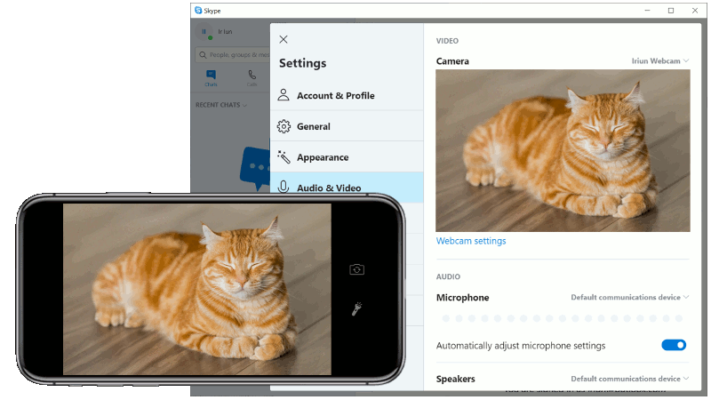
Iriun Webcam 2.8.10 is a lightweight and efficient tool that allows you to use your smartphone as a wireless webcam for your computer. Whether you are attending online meetings, streaming, or recording videos, this app provides an easy and affordable alternative to traditional webcams.
Key Features of Iriun Webcam 2.8.10
Wireless Connection
The app connects your phone to your PC or Mac over Wi-Fi, eliminating the need for USB cables.
High-Quality Video
Enjoy full HD video quality for clear and professional visuals in your video calls and recordings.
Cross-Platform Support
Iriun Webcam works on both Windows and macOS, making it a versatile solution for most users.
Easy Setup
Simply install the app on your phone and the client software on your computer. After that, your phone camera is instantly recognized as a webcam.
Compatible with Major Apps
Use it with popular platforms like Zoom, Skype, Microsoft Teams, OBS Studio, and more.
Benefits of Using Iriun Webcam
Save money by using your phone instead of buying an external webcam.
Enjoy superior image quality compared to many built-in laptop webcams.
Wireless setup for maximum flexibility in camera placement.
How to Install Iriun Webcam 2.8.10
Download and install the Iriun Webcam app on your Android or iOS device.
Download and install the Iriun Webcam client software on your PC or Mac.
Connect both devices to the same Wi-Fi network.
Launch the app and your phone camera will be detected as a webcam automatically.
Conclusion
Iriun Webcam 2.8.10 is a smart solution for anyone looking to improve their video quality without purchasing new hardware. With wireless connectivity, high-quality video, and compatibility with major platforms, it’s an excellent tool for professionals, students, and streamers.
✔ Tested: This software was tested on Windows 10 & Windows 11 and works smoothly without issues.
Frequently Asked Questions
- Is this software free?
Yes, it can be downloaded and used for free. - Does it support Windows 11?
Yes, it works perfectly on Windows 10 and 11. - Is it safe to use?
Yes, the software was scanned and tested before publishing.
Last updated: January 2026