Gone are the days of Origin—EA App 13.560.0.6073 is Electronic Arts’ modern, streamlined launcher for PC gamers, designed to deliver faster downloads, smoother updates, and a cleaner interface for accessing top titles like Apex Legends, FIFA 24, The Sims 4, and Battlefield. This latest version refines performance, fixes common bugs, and enhances user experience across Windows 10 and 11.
Why EA Replaced Origin with EA App
Launched as a successor to the aging Origin platform, the EA App was built from the ground up to address long-standing user complaints: slow downloads, high RAM usage, and clunky navigation. Version 13.560.0.6073 represents a mature iteration—stable, efficient, and focused on what matters most: getting you into the game faster.
Key Features of EA App 13.560
1. Faster Download & Installation Speeds
Thanks to an optimized backend and improved peer-to-peer (P2P) technology, EA App now delivers up to 2x faster game downloads compared to early versions. Large titles like Battlefield 2042 install significantly quicker, with resume support after interruptions.
2. Clean, Intuitive Interface
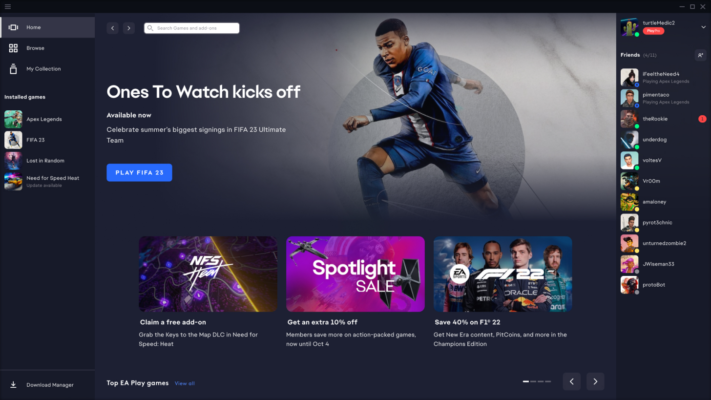
The redesigned dashboard highlights your owned games, friends list, and news without clutter. Game pages load instantly, and library management is simplified—ideal for casual and hardcore gamers alike.
3. Seamless Game Updates
Updates now download in the background and apply only when you’re not playing, reducing downtime. Patch notes are displayed clearly, and rollback options are available for select titles if an update causes issues.
4. Integrated EA Play Membership
Subscribers to EA Play (included with Xbox Game Pass Ultimate or as a standalone plan) get instant access to a rotating library of EA games, early trials (e.g., 10-hour FIFA trials), and 10% discount on EA digital purchases—all visible directly in the app.
5. Better System Resource Management
EA App 13.560 uses less CPU and RAM at idle, addressing one of the biggest criticisms of Origin. It also supports hardware-accelerated decoding for smoother video playback in game trailers.
6. Cloud Saves & Cross-Progression
Your progress in supported games (like The Sims 4 or Apex Legends) syncs automatically to the cloud, allowing you to switch PCs without losing data—provided you’re logged into the same EA account.
Troubleshooting & Stability in v13.560.0.6073
This specific build includes critical fixes for:
- Login loops on Windows 11
- Game launch failures after Windows updates
- Corrupted download caches
- Overlay conflicts with Discord or GeForce Experience
EA has also improved error messaging—so if something goes wrong, you’ll get actionable guidance instead of vague codes.
Limitations to Note
- PC only: No macOS or Linux support.
- No third-party game integration: Unlike Steam, it only hosts EA titles.
- Mandatory account: You must link an EA account (formerly Origin ID).
Final Thoughts
EA App 13.560.0.6073 marks a turning point for EA’s PC platform—transforming it from a necessary evil into a genuinely user-friendly launcher. While it may never match Steam’s ecosystem breadth, it excels at its core mission: delivering EA’s games reliably, quickly, and without bloat.
For fans of Apex Legends, FIFA, Madden, or The Sims, the EA App is now a polished, efficient gateway to your favorite experiences—finally worthy of the games it delivers.
✔ Tested: This software was tested on Windows 10 & Windows 11 and works smoothly without issues.
Frequently Asked Questions
- Is this software free?
Yes, it can be downloaded and used for free. - Does it support Windows 11?
Yes, it works perfectly on Windows 10 and 11. - Is it safe to use?
Yes, the software was scanned and tested before publishing.
Last updated: January 2026