For electronics enthusiasts, hobbyists, and professional engineers, Fritzing has become one of the most popular tools for circuit design and prototyping. The software bridges the gap between breadboard experimentation and professional PCB creation, making it ideal for both beginners and advanced users. With the release of Fritzing 1.0.5, users get an improved and more stable environment to design, document, and share their electronic projects and buy.
Why Use Fritzing?
Fritzing is an open-source software that provides a simple way to take your ideas from a breadboard prototype to a finished PCB. It is especially popular in the maker community because of its strong support for Arduino and other microcontroller projects.
Key Benefits:
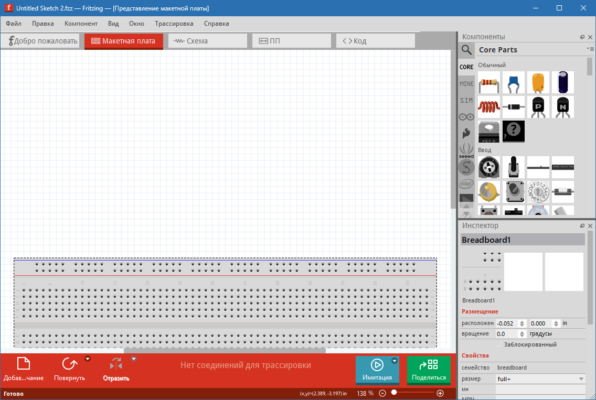
Breadboard View: Replicate your real-world wiring and see how your components connect.
Schematic View: Convert your breadboard layout into professional circuit diagrams.
PCB View: Design your own printed circuit boards and export Gerber files for manufacturing.
Part Library: Thousands of electronic components, with the ability to add custom parts.
Community Support: A large online community where users share designs, tutorials, and parts.
What’s New in Fritzing 1.0.5
The latest version improves performance and introduces several fixes:
Enhanced support for modern operating systems (Windows 11, macOS, Linux).
Updated parts library with more accurate components.
Bug fixes for schematic alignment and PCB exports.
Better stability when handling large and complex projects.
How Fritzing Helps Makers and Students
Fritzing is widely used in STEM education, DIY electronics, and rapid prototyping. For students, it provides a visual and practical way to learn about circuits. For makers, it offers a fast path from idea to working PCB without needing expensive professional tools.
System Requirements
Operating System: Windows, macOS, Linux
Processor: 2 GHz or faster
RAM: Minimum 2 GB (4 GB recommended)
Disk Space: 500 MB free space
Who Should Use Fritzing?
Students learning electronics and microcontroller programming.
Hobbyists creating DIY Arduino, Raspberry Pi, or IoT projects.
Engineers who need quick prototyping before moving to professional CAD tools.
Educators teaching electronics in schools and universities.
Final Verdict
Fritzing 1.0.5 remains one of the most user-friendly open-source tools for electronics design. With its powerful breadboard, schematic, and PCB views, it provides everything needed to turn ideas into real-world circuits. Whether you are a beginner or an experienced engineer, Fritzing makes circuit design accessible, collaborative, and fun.
If you’re looking for an easy and reliable PCB design tool, Fritzing 1.0.5 is the perfect choice.
✔ Tested: This software was tested on Windows 10 & Windows 11 and works smoothly without issues.
Frequently Asked Questions
- Is this software free?
Yes, it can be downloaded and used for free. - Does it support Windows 11?
Yes, it works perfectly on Windows 10 and 11. - Is it safe to use?
Yes, the software was scanned and tested before publishing.
Last updated: January 2026