
Network visibility is essential for diagnosing connectivity issues, analyzing traffic, and detecting suspicious activity. While Windows provides basic tools like Task Manager and Resource Monitor, they often lack detailed insights. TCPView 4.19, a Microsoft Sysinternals utility, offers a powerful way to view and manage all active TCP and UDP connections on a Windows system in real time.
What is TCPView?
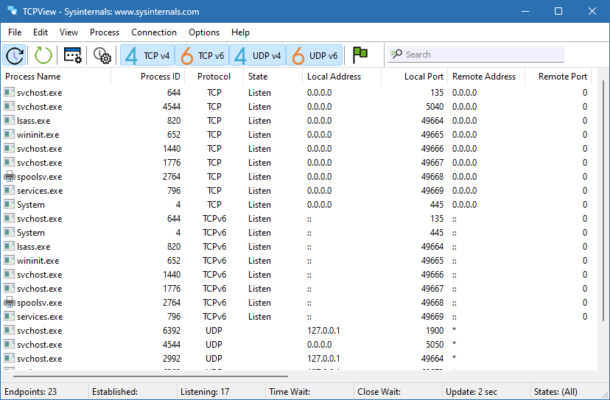
TCPView is a lightweight but powerful network monitoring tool developed by Sysinternals (now part of Microsoft). It provides detailed information about active network connections, including the process name, protocol type (TCP or UDP), local and remote addresses, ports, and the current connection state.
Compared to the built-in netstat command, TCPView offers a much more user-friendly graphical interface, making it easier to identify and troubleshoot network issues.
Key Features of TCPView 4.19
1. Real-Time Network Monitoring
Displays all TCP and UDP endpoints.
Updates continuously to reflect live network activity.
2. Process Identification
Shows which processes are using specific network connections.
Helps detect suspicious or unauthorized applications.
3. Connection Details
Provides detailed information on local and remote addresses, ports, and protocols.
Displays connection states such as LISTENING, ESTABLISHED, or TIME_WAIT.
4. Easy Management
Right-click menu allows you to close unwanted connections instantly.
Kill processes directly from the interface if needed.
5. Export and Logging
Export session data for later analysis.
Useful for IT audits and troubleshooting records.
What’s New in Version 4.19?
Updated compatibility for the latest versions of Windows.
Improved stability when monitoring high-volume connections.
Bug fixes related to IPv6 connection handling.
Optimized performance for smoother real-time updates.
Benefits of Using TCPView 4.19
For IT Administrators
Quickly identify which applications are consuming bandwidth.
Detect unusual or malicious connections on a network.
For Developers
Debug network applications by monitoring their connection behavior.
Verify whether ports are properly opened or closed during development.
For Everyday Users
Monitor suspicious applications connecting to the internet.
Troubleshoot slow or unstable internet connections.
How to Use TCPView 4.19
Step 1: Download and Run
TCPView is a standalone executable—no installation required. Simply download the utility and run it.
Step 2: Monitor Connections
The main interface lists all active connections along with process names and states.
Step 3: Analyze Processes
Double-click on any process to see detailed information, including its path and network usage.
Step 4: Manage Connections
Right-click to close connections or terminate the process if it is unwanted or malicious.
Step 5: Export Data
Save the list of connections for later analysis or troubleshooting.
Why Choose TCPView Over Other Tools?
Official Microsoft Sysinternals tool – trusted and secure.
Lightweight and portable – no installation required.
User-friendly interface – easier than command-line tools like
netstat.Real-time insights – continuously updated view of network activity.
Conclusion
TCPView 4.19 is an indispensable tool for anyone who needs clear visibility into their Windows system’s network activity. Whether you are an IT professional monitoring enterprise connections, a developer debugging network behavior, or a user checking for suspicious processes, TCPView delivers the insights you need in a lightweight and easy-to-use package.
For advanced troubleshooting and security, TCPView 4.19 is one of the most reliable and essential utilities available from the Microsoft Sysinternals suite.
✔ Tested: This software was tested on Windows 10 & Windows 11 and works smoothly without issues.
Frequently Asked Questions
- Is this software free?
Yes, it can be downloaded and used for free. - Does it support Windows 11?
Yes, it works perfectly on Windows 10 and 11. - Is it safe to use?
Yes, the software was scanned and tested before publishing.
Last updated: January 2026