
Modern Smart TVs from brands like Samsung, LG, Sony, Panasonic, and Toshiba allow exporting their channel lists. However, manually sorting or renaming hundreds of channels directly on the TV can be frustrating and time-consuming. This is where ChanSort 2025-03-08 comes in.
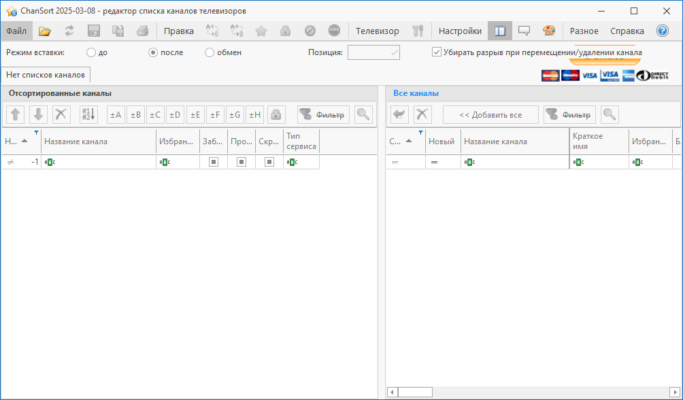
ChanSort is a free and open-source tool that makes it simple to organize, rename, and edit TV channel lists on your computer. Whether you want to group channels by category, rename them for easier navigation, or remove duplicates, ChanSort provides all the flexibility you need.
What is ChanSort?
ChanSort is a cross-platform utility that supports channel list files exported from many Smart TVs. By transferring your TV’s channel list to a USB stick, you can load it into ChanSort, make changes, and then re-import it back to your TV.
The 2025-03-08 release introduces improvements in compatibility, performance, and bug fixes, making the process smoother for a wide variety of TV brands and models.
Key Features of ChanSort 2025-03-08
1. Wide TV Compatibility
Supports Samsung, LG, Sony, Toshiba, Panasonic, Philips, Hisense, and more.
2. Drag-and-Drop Channel Sorting
Reorder channels easily by dragging them into position.
3. Batch Editing Tools
Rename, delete, or move multiple channels at once.
4. Favorites & Groups
Create favorites lists or custom groups for quick access.
5. Search & Filter Options
Find channels quickly by name, number, or category.
6. Safe File Handling
Edits are applied without corrupting your TV’s database files.
7. Open-Source & Free
Completely free to use with regular updates from the developer community.
What’s New in Version 2025-03-08?
Enhanced support for the latest Samsung Tizen-based TVs.
Improved parsing of LG and Sony channel databases.
Faster list loading for large channel files.
Bug fixes related to DVB-C and DVB-S sorting.
Updated interface with better readability.
Benefits of Using ChanSort
For Families
Quickly organize channels into favorites, making it easy for kids and parents to find their preferred stations.
For Enthusiasts
Create custom channel layouts with satellite, cable, and terrestrial mixes.
For Everyday Viewers
Save time by sorting channels on your PC instead of using the TV’s remote control.
How to Use ChanSort 2025-03-08
Step 1: Export Channel List from TV
Insert a USB drive into your Smart TV and export the channel list.
Step 2: Open with ChanSort
Load the channel list file into ChanSort on your computer.
Step 3: Organize Channels
Use drag-and-drop, renaming, or filters to arrange your list.
Step 4: Save & Import Back
Save the updated list and re-import it into your TV via USB.
Why Choose ChanSort Over Manual Editing?
Sorting channels with a TV remote is tedious, especially when dealing with hundreds of digital or satellite channels. ChanSort speeds up the process, giving you desktop-level control over your channel lineup.
Compared to other tools, ChanSort stands out for its broad compatibility, user-friendly interface, and open-source nature.
Conclusion
ChanSort 2025-03-08 is the perfect tool for anyone who wants an organized, personalized TV channel lineup. With features like drag-and-drop sorting, batch editing, and support for multiple TV brands, it saves time and improves the TV-watching experience.
Whether you’re a casual user or a satellite TV enthusiast, ChanSort ensures your channel list is always neat, easy to navigate, and tailored to your needs. And best of all, it’s completely free.
✔ Tested: This software was tested on Windows 10 & Windows 11 and works smoothly without issues.
Frequently Asked Questions
- Is this software free?
Yes, it can be downloaded and used for free. - Does it support Windows 11?
Yes, it works perfectly on Windows 10 and 11. - Is it safe to use?
Yes, the software was scanned and tested before publishing.
Last updated: January 2026