
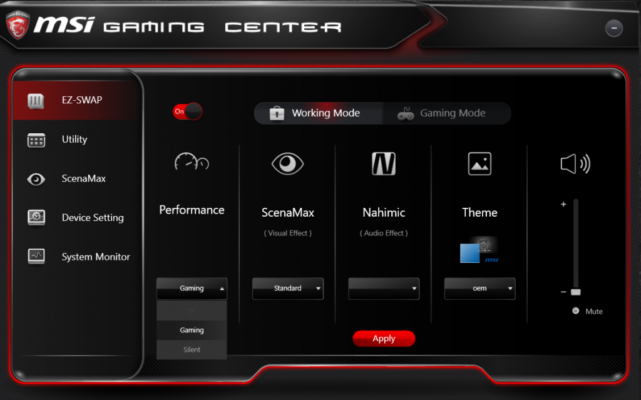
MSI Gaming App 6.2.0.98 is a simple Windows utility designed for MSI gaming hardware. It lets users boost performance with one-click modes, control fan speed, tweak GPU lighting, and monitor system stats like FPS and temperature—without overwhelming them with complex settings and see MSI Super Charger .
🔑 Key Features
One-Click Modes: Switch between OC, Gaming, Silent, and VR profiles to adjust clock speeds, fan curves, and performance settings easily. OC mode maximizes output, while Silent mode prioritizes quiet operation.
On-Screen Stats: Display real-time FPS, GPU/CPU clocks, usage, temperatures, and VRAM load while gaming for performance awareness.
Lighting Control: Customize RGB and LED effects on compatible MSI graphics cards using built-in presets to match themes or mood.
Eye Rest Mode: Offers preset display profiles (Gaming, Movie, EyeRest) to reduce eye strain by adjusting contrast and color settings.
VR Optimization: Activates a VR mode to optimize system performance and minimize interference for virtual reality use.
Lightweight & Portable: Easy to install, requiring minimal resources—and now effectively integrated into MSI Dragon Center for newer systems.
🛠 Compatibility & Requirements
Operating Systems: Supported on Windows 7, 8, 10, and 11.
Hardware: Best suited for MSI gaming branded graphics cards or motherboards.
Dependencies: May require Microsoft .NET Framework and Visual C++ redistributables to run.
⚠ Known Issues
Some reports indicate the app may crash or close unexpectedly on systems with outdated firmware or lacking Intel ME drivers, especially when used alongside newer MSI utilities.
MSI has since transitioned many of these features into MSI Dragon Center, marking this app as legacy for newer hardware.
🎯 Who Is It For?
Gamers wanting easy performance tuning without advanced overclocking tools.
MSI hardware owners seeking quick lighting and display adjustments.
Users looking for basic real-time system monitoring on-screen.
Anyone using older MSI hardware or preferring standalone utilities over centralized suites.
✅ Why Choose MSI Gaming App?
Simple and intuitive interface—no steep learning curve.
Effective one-click mode switching for different usage scenarios.
Smart blend of performance tuning, eye-care settings, and lightweight monitoring.
Retains full functionality even on older Windows systems and MSI setups.
✔ Tested: This software was tested on Windows 10 & Windows 11 and works smoothly without issues.
Frequently Asked Questions
- Is this software free?
Yes, it can be downloaded and used for free. - Does it support Windows 11?
Yes, it works perfectly on Windows 10 and 11. - Is it safe to use?
Yes, the software was scanned and tested before publishing.
Last updated: January 2026