
Microsoft Office 2007: The Suite That Redefined How We Work 🖥️✨
Released in 2007, Microsoft Office 2007 marked a major turning point in productivity software. It introduced the revolutionary Ribbon user interface, replacing traditional menus and toolbars, and brought significant enhancements to Word, Excel, PowerPoint, Outlook, and other core applications.
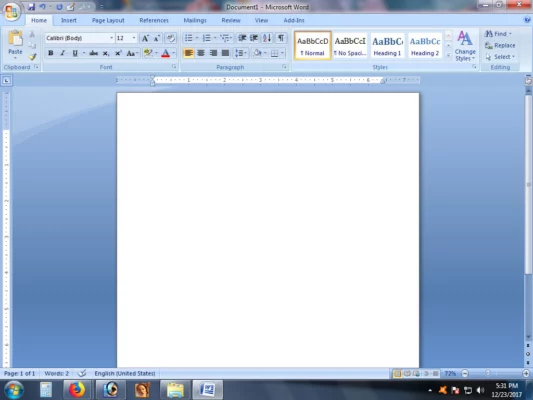
While newer versions are available, Office 2007 remains relevant for legacy systems, compatibility needs, and historical interest. It was the suite that reshaped user interaction with office applications.
🎯 Why Was Microsoft Office 2007 Revolutionary?
- ✅ Introduced the Ribbon UI: A game-changing, tabbed interface for easier access to features
- ✅ Enhanced File Formats: Introduced
.docx,.xlsx,.pptxfor better file compression and security - ✅ Improved Graphics & Formatting: Better image handling, SmartArt, and themes
- ✅ Enhanced Collaboration Tools: Improved track changes, comments, and document management
- ✅ Backward Compatibility: Could open older
.doc,.xls,.pptfiles (with compatibility pack)
It was designed for Windows Vista and XP, but also worked on Windows 7 initially.
✨ Key Features Introduced in Office 2007
📝 1. The Ribbon Interface
- Contextual tabs (e.g., “Picture Tools” when inserting an image)
- Quick Access Toolbar for frequently used commands
- More intuitive discovery of features compared to nested menus
📊 2. Enhanced Excel Capabilities
- New charting engine with more visual options
- Improved data analysis tools (PivotTables, conditional formatting)
- Better formula auditing and error checking
🎯 3. PowerPoint Innovations
- New slide layouts and design themes
- Improved animation and transition effects
- Better multimedia integration (video, audio)
📧 4. Outlook Improvements
- Enhanced email management with Conversation View
- Improved calendar and task features
- Better integration with other Office apps
🛠️ Applications Included
- Microsoft Word 2007: Word processing
- Microsoft Excel 2007: Spreadsheet application
- Microsoft PowerPoint 2007: Presentation software
- Microsoft Outlook 2007: Email and personal information manager
- Microsoft Access 2007: Database management (in Professional/Ultimate editions)
- Microsoft Publisher 2007: Desktop publishing (in Professional/Ultimate editions)
- Microsoft InfoPath 2007: Form design (in Professional/Ultimate editions)
🆚 Office 2007 vs. Modern Office (365/2021/2024)
Office 2007 laid the foundational UI groundwork for all subsequent versions.
⚠️ Important Notes
- Support Ended: Microsoft ended support for Office 2007 on October 10, 2017. This means no more security updates or technical support. Using it on internet-connected systems poses security risks.
- Compatibility: While it can open newer files with a compatibility pack, saving in older formats (
.doc,.xls) is often necessary for compatibility with older systems. - Usage Today: Mainly used for legacy systems, archival purposes, or specific compatibility requirements.
💡 Final Thoughts: A Pivotal Moment in Productivity
Microsoft Office 2007 was a pivotal release that fundamentally changed how users interact with productivity software. Its Ribbon interface became the standard, and many of its file format and feature innovations are still used today.
While no longer recommended for active use due to lack of support, it remains a significant milestone in the evolution of office suites.
📊 Revolutionary. Historic. Foundational.
🌐 Official Microsoft page (archived): https://www.microsoft.com/en-us/download/details.aspx?id=18 (Note: This is for archival reference; support has ended.)
💻 Compatible with Windows Vista, Windows XP, Windows Server 2003 (originally). Support for Windows 7 was later discontinued.
✔ Tested: This software was tested on Windows 10 & Windows 11 and works smoothly without issues.
Frequently Asked Questions
- Is this software free?
Yes, it can be downloaded and used for free. - Does it support Windows 11?
Yes, it works perfectly on Windows 10 and 11. - Is it safe to use?
Yes, the software was scanned and tested before publishing.
Last updated: January 2026