
🛠️ Claris FileMaker Pro 22.0.3.300: Turn Ideas into Custom Business Apps—Fast
Need a tailored solution for inventory tracking, project management, CRM, or field reporting—but don’t have a developer on staff? Claris FileMaker Pro 22.0.3.300 empowers teams to build secure, scalable, custom apps without writing a single line of code.
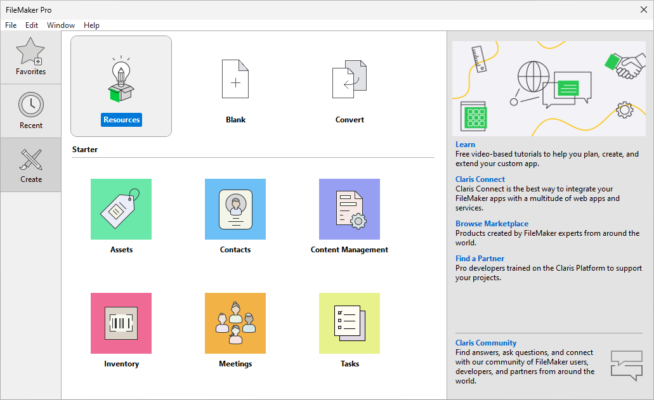
Developed by Claris (an Apple subsidiary), FileMaker Pro combines the simplicity of a spreadsheet with the power of a relational database—and adds mobile, cloud, and automation capabilities. Version 22.0.3.300 delivers critical stability improvements, enhanced security, and better integration with modern workflows.
🌟 Why FileMaker Pro Stands Out
Unlike generic database tools, FileMaker Pro is designed for real-world business problems. Its intuitive drag-and-drop interface lets you:
- Design custom layouts with forms, buttons, and charts
- Link multiple tables with relational logic
- Automate workflows with scripts and calculations
- Deploy apps to Windows, macOS, iOS, and the web
💡 Perfect for small to mid-sized businesses that need flexibility without the cost or complexity of enterprise ERP systems.
🔧 Key Features in Version 22.0.3.300
- Improved performance for large datasets and complex scripts
- Enhanced security: stronger encryption, updated TLS support
- Better compatibility with macOS Sonoma and Windows 11
- Refined UI with dark mode support and responsive layout tools
- Reliable syncing with Claris Cloud and FileMaker Server
This maintenance release focuses on stability, security, and reliability—making it ideal for production environments.
📱 Build Once, Deploy Everywhere
Create your app on desktop, then instantly make it available on:
- iPhone & iPad (via FileMaker Go)
- Web browsers (via FileMaker WebDirect)
- Claris Cloud (for hassle-free hosting)
All data stays synchronized in real time—whether your team is in the office, on-site, or working remotely.
🎯 Ideal Use Cases
- Sales teams: Custom CRM with lead tracking & reporting
- Field service: Work order management with photo capture
- Education: Student records, attendance, and grading systems
- Nonprofits: Donor management and event coordination
- Manufacturing: Inventory, QC checklists, and asset tracking
✅ FileMaker Pro scales from a single-user solution to a multi-user system supporting hundreds of concurrent users via FileMaker Server.
🔒 Enterprise-Grade, Yet Easy to Use
Behind its simple interface, FileMaker Pro offers:
- Role-based access control
- Audit logging
- Data encryption at rest and in transit
- Integration with SQL databases, REST APIs, and Apple Shortcuts
And because it’s part of the Apple ecosystem, it integrates seamlessly with iCloud, Contacts, Calendar, and more on macOS and iOS.
💼 Licensing & Getting Started
FileMaker Pro is available through subscription (monthly or annual) with options for:
- Individual users
- Teams (via Claris Cloud)
- On-premise deployment (with FileMaker Server)
A free 45-day trial is available—no credit card required.
🌐 Official Website
🔗 Learn more & download: https://www.claris.com/filemaker/
🔚 Final Thoughts
Claris FileMaker Pro 22.0.3.300 remains one of the most powerful no-code platforms for custom business applications. It bridges the gap between spreadsheets and complex development—giving teams the tools to solve unique challenges quickly, securely, and affordably.
If your business relies on manual processes, disconnected spreadsheets, or outdated paper forms, it’s time to build a better way—with FileMaker Pro.
✔ Tested: This software was tested on Windows 10 & Windows 11 and works smoothly without issues.
Frequently Asked Questions
- Is this software free?
Yes, it can be downloaded and used for free. - Does it support Windows 11?
Yes, it works perfectly on Windows 10 and 11. - Is it safe to use?
Yes, the software was scanned and tested before publishing.
Last updated: January 2026