R-Wipe & Clean 20.0.2518 is a professional-grade utility designed to help Windows users clean temporary files, erase digital footprints, optimize system performance, and securely delete sensitive data. Developed by R-Tools Technology, this powerful tool goes beyond basic disk cleanup by offering deep system scanning, browser trace removal, startup optimization, and secure file wiping using military-grade erasure algorithms and buy.
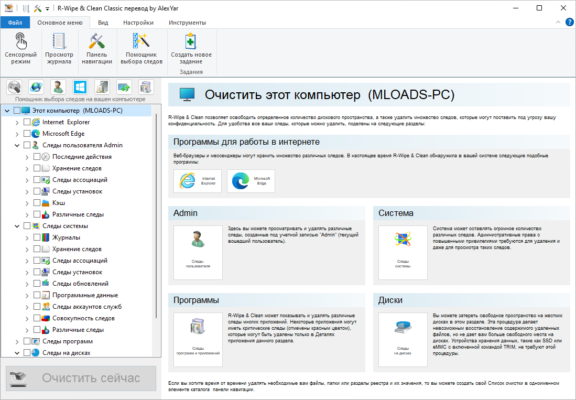
Whether you’re preparing your PC for resale, improving performance, or protecting your privacy, R-Wipe & Clean 20.0.2518 delivers comprehensive control over what stays — and what gets erased — from your system.
Why Choose R-Wipe & Clean?
While Windows has built-in tools like Disk Cleanup and Storage Sense, they often miss hidden junk files and browsing traces. R-Wipe & Clean fills the gap with:
- ✅ Deep cleaning of 100+ file types
- ✅ Secure deletion with DoD 5220.22-M, Gutmann, and other standards
- ✅ One-click system optimization
- ✅ Support for SSDs and HDDs
- ✅ Customizable cleaning profiles
Ideal for advanced users, IT professionals, and anyone concerned about digital privacy.
Key Features of R-Wipe & Clean 20.0.2518
1. Comprehensive System Cleaning
Automatically finds and removes:
- Temporary files (Windows, app, installer)
- Log files, cache, and dump files
- Old downloads and recycle bin contents
- Thumbnail caches (Thumbs.db)
- Memory dumps and crash reports
Frees up gigabytes of hidden space without affecting essential system files.
2. Browser & Online Activity Erasure
Erase traces from all major browsers:
- Google Chrome
- Mozilla Firefox
- Microsoft Edge
- Opera, Brave, Vivaldi
Removes:
- Browsing history
- Cookies and site data
- Download history
- Saved passwords (optional)
- Autofill and search history
Protects your privacy when sharing a computer.
3. Secure File & Folder Wiping
Permanently delete sensitive files so they cannot be recovered by data recovery tools:
- Use DoD 5220.22-M, Gutmann (35-pass), or RCMP TSSIT OPS-II
- Wipe free disk space to erase remnants of deleted files
- Supports SSD TRIM command for modern drives
Essential for:
- Selling or donating your PC
- Deleting financial, medical, or personal documents
4. Startup & Service Manager
Optimize boot time by managing:
- Programs that launch at startup
- Windows services
- Scheduled tasks
Disable unnecessary items that slow down your system.
5. Free Disk Space Wipe
After deleting files, their data may still exist on disk until overwritten. This feature:
- Fills empty space with random data
- Ensures no deleted file can be restored
- Works on internal drives, external USBs, and SD cards
6. Custom Cleaning Rules
Create personalized cleanup profiles:
- Define which folders or file types to wipe
- Schedule automatic cleanups (daily, weekly, monthly)
- Run cleanup before shutdown or at idle
Perfect for automated maintenance.
7. Detailed Reporting & Logging
After each wipe:
- View a full log of deleted files
- Export reports for auditing
- Confirm secure erasure compliance
Useful in corporate or regulated environments.
How to Use R-Wipe & Clean 20.0.2518
- Download and Install
- Get the installer from the official R-Tools website.
- Run
RWipeClean.exeand follow setup instructions.
- Scan Your System
- Launch the app and click “Analyze”.
- It scans for temporary files, browser data, and traces.
- Select Items to Clean
- Review detected files and check what you want to remove.
- Expand categories to see exact locations.
- Choose Wipe Method (Optional)
- For sensitive data, select “Secure Erase” with your preferred algorithm.
- Start Cleaning
- Click “Wipe” to begin.
- Wait for completion — speed depends on data volume.
- Schedule Automation (Pro Tip)
- Set up a scheduled task to run weekly cleanup automatically.
Who Should Use R-Wipe & Clean?
✅ Privacy-Conscious Users – Erase browsing and system traces
✅ IT Administrators – Prepare PCs for redeployment
✅ Businesses – Comply with data protection policies
✅ Gamers & Power Users – Free up space and boost performance
✅ Anyone selling or recycling a computer – Securely wipe personal data
R-Wipe & Clean vs. Other Cleaners
R-Wipe & Clean excels in security, customization, and deep cleaning.
Final Thoughts
R-Wipe & Clean 20.0.2518 is one of the most reliable and thorough system cleanup tools available for Windows. With its advanced wiping algorithms, deep scanning, and privacy protection features, it’s ideal for users who want more than just a simple disk cleaner.
Whether you’re optimizing performance, protecting sensitive data, or preparing a machine for disposal, this tool gives you complete control over your digital footprint.
💾 Download R-Wipe & Clean 20.0.2518 today from the official R-Tools website and take full command of your Windows system — clean, secure, and optimized.
🔐 Always download from official sources to avoid fake or malware-infected versions.
✔ Tested: This software was tested on Windows 10 & Windows 11 and works smoothly without issues.
Frequently Asked Questions
- Is this software free?
Yes, it can be downloaded and used for free. - Does it support Windows 11?
Yes, it works perfectly on Windows 10 and 11. - Is it safe to use?
Yes, the software was scanned and tested before publishing.
Last updated: January 2026