
Overview of Q-Dir 12.33
Q-Dir 12.33 is a lightweight and highly efficient file manager for Windows designed to make file organization faster and more convenient. Unlike the default Windows File Explorer, Q-Dir offers a unique quad-pane interface that allows you to view and manage multiple folders simultaneously.
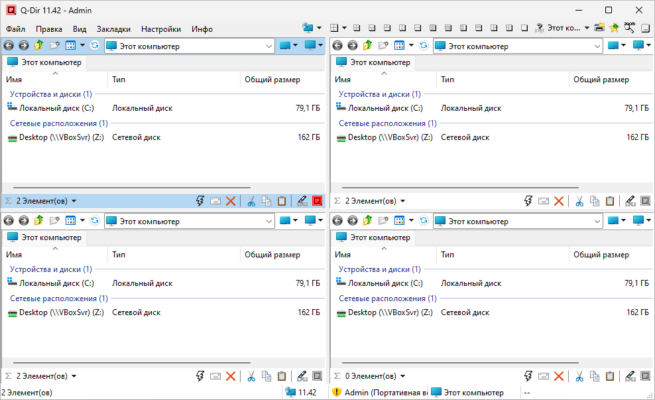
With advanced navigation tools, customizable layouts, and drag-and-drop support, Q-Dir has become a go-to tool for professionals who handle large amounts of files on a daily basis.
Key Features
1. Quad-Pane Interface
View and organize files across four panes at once.
Each pane supports independent navigation.
Switch between dual, triple, or quad layouts.
2. Tabbed Navigation
Multiple tabs for each pane.
Quickly switch between folders without losing track.
Save and restore favorite layouts.
3. Customization Options
Change color filters for different file types.
Create favorite folder shortcuts.
Personalize toolbar and layout settings.
4. Advanced File Management
Drag-and-drop across panes.
Copy, move, or compare files easily.
Supports ZIP archives and network folders.
Benefits
Greatly improves productivity with a multi-pane layout.
Saves time when working with complex folder structures.
Portable version available for use without installation.
Lightweight and fast compared to traditional file managers.
System Requirements
OS: Windows 7, 8, 10, 11 (32-bit & 64-bit)
RAM: 2 GB or higher recommended
Storage: At least 50 MB free space
Processor: 1 GHz or faster
Q-Dir 12.33 is the perfect choice for users who want a faster, smarter, and customizable alternative to the default Windows File Explorer.
✔ Tested: This software was tested on Windows 10 & Windows 11 and works smoothly without issues.
Frequently Asked Questions
- Is this software free?
Yes, it can be downloaded and used for free. - Does it support Windows 11?
Yes, it works perfectly on Windows 10 and 11. - Is it safe to use?
Yes, the software was scanned and tested before publishing.
Last updated: January 2026