
📁 Directory List & Print Pro 4.35: The Smart Way to Document Your File System
Managing large volumes of files? Need to audit, archive, or share a snapshot of your folder structure? Directory List & Print Pro 4.35 is a lightweight yet powerful Windows utility that lets you generate, customize, and export detailed reports of any directory—complete with file names, sizes, dates, attributes, and more.
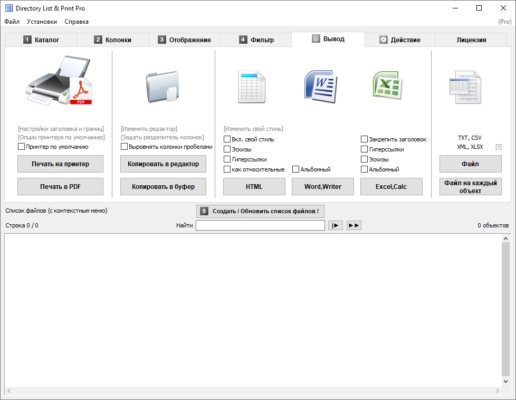
Whether you’re an IT admin, archivist, legal professional, or home user organizing decades of photos and documents, this tool turns complex folder trees into clear, printable, or exportable reports in seconds.
🚀 Why Use Directory List & Print Pro?
Unlike built-in Windows commands (like dir or PowerShell scripts), this software offers a user-friendly interface, real-time previews, and dozens of customization options—all without technical know-how.
Version 4.35 refines performance, improves Unicode support, and enhances export reliability—making it the most stable release yet.
✅ Core Features:
- Scan any folder (local, network, or external drive)
- Include/exclude files by extension, size, or date
- Show file attributes: size, creation/modification date, version, CRC checksum
- Export to: TXT, HTML, CSV, XML, Excel, or print directly
- Custom templates for professional-looking reports
- Folder tree visualization with collapsible structure
💡 Tip: Use the “Save Profile” feature to reuse your favorite settings across multiple directories—perfect for recurring audits.
📊 Ideal Use Cases
- IT Departments: Document server contents before migration or decommissioning
- Legal & Compliance Teams: Generate file inventories for eDiscovery
- Photographers & Designers: Catalog project folders for clients
- Home Users: Print a backup list of important documents or media
- Teachers & Researchers: Track digital resources by semester or topic
🎨 Fully Customizable Output
You’re not stuck with plain text. With Directory List & Print Pro 4.35, you can:
- Choose font, colors, and layout
- Add headers, footers, and page numbers
- Insert company logos (in HTML/Print modes)
- Sort files by name, size, date, or type
- Hide system/hidden files if needed
The HTML export even includes collapsible folders and clickable links—ideal for internal documentation portals.
🔒 Lightweight & Secure
The software runs 100% offline—no internet connection required. It doesn’t modify your files or folders; it only reads and reports. This makes it safe for sensitive environments.
Plus, it’s compatible with Windows 7 through Windows 11 (32-bit & 64-bit), including server editions.
💼 Pro vs. Free Version
While a free version exists, Pro 4.35 unlocks critical features like:
- Export to Excel and XML
- Advanced filtering (regex support)
- Batch processing of multiple folders
- Command-line automation for scheduled reports
For professionals, the Pro edition pays for itself in time saved.
🌐 Official Website & Download
Developed by Informatik GmbH, Directory List & Print Pro offers a fully functional 30-day trial—no watermarks, no limits.
🔗 Official Site: https://www.informatik.com/dlpp/
🔚 Final Thoughts
In a world overflowing with digital files, knowing what you have—and where it is—matters more than ever. Directory List & Print Pro 4.35 delivers clarity, control, and efficiency with minimal effort. Whether you need a quick printout or a structured data export, it’s the smart, reliable choice for anyone managing files on Windows.
✔ Tested: This software was tested on Windows 10 & Windows 11 and works smoothly without issues.
Frequently Asked Questions
- Is this software free?
Yes, it can be downloaded and used for free. - Does it support Windows 11?
Yes, it works perfectly on Windows 10 and 11. - Is it safe to use?
Yes, the software was scanned and tested before publishing.
Last updated: January 2026