
AbleFTP 13.16 Overview
AbleFTP 13.16 is a powerful and reliable FTP automation tool designed for users who need to schedule and manage file transfers automatically. It simplifies repetitive FTP operations by allowing users to set tasks that run on specific schedules, making it ideal for system administrators, web developers, and businesses managing large volumes of data.
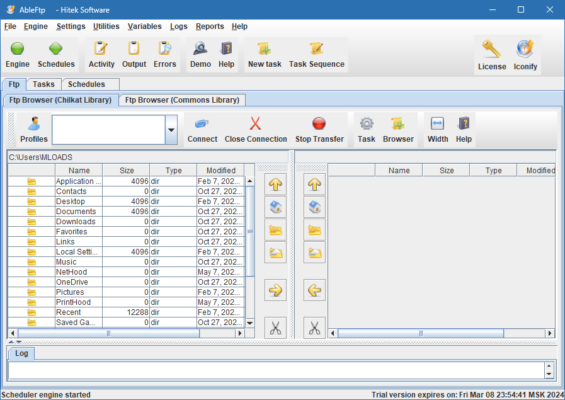
The program offers an intuitive interface and a wide set of features for automating file uploads, downloads, synchronization, and backups between local computers and remote FTP servers. Whether you manage a website or need to transfer business reports daily, AbleFTP helps save time and eliminate manual work.
Key Features of AbleFTP 13.16
1. Automated FTP Transfers
AbleFTP enables automatic uploading, downloading, and synchronization of files between your computer and any FTP server. You can create scheduled tasks to perform these operations at specific times or intervals.
2. Advanced Task Scheduler
With its built-in scheduler, users can set hourly, daily, weekly, or monthly FTP jobs. The scheduler runs in the background and executes transfers automatically, even when you are away from your PC.
3. Secure and Reliable Transfers
The software supports FTPS (FTP Secure) and SFTP (SSH File Transfer Protocol) to protect your data during transfer. It ensures encryption and authentication to maintain data integrity and privacy.
4. Synchronization and Backup
AbleFTP can synchronize local and remote directories, ensuring that both sides always have the latest files. It’s an excellent solution for automated backups, especially for websites or database exports.
5. Email Notifications and Logging
Each scheduled task can be configured to send email notifications after completion or failure. Detailed logs help users track all transfer activities for better control and monitoring.
How to Use AbleFTP 13.16
Connect to your FTP server – Enter your server address, username, and password.
Create a new task – Choose upload, download, or sync operation.
Set a schedule – Configure the task to run automatically at your preferred intervals.
Add notifications – Enable email alerts for task success or failure.
Run or save – Execute immediately or let the scheduler handle it automatically.
Why Choose AbleFTP 13.16?
This latest version brings improved stability, enhanced SFTP compatibility, and faster transfer performance. Its automation capabilities help businesses eliminate repetitive manual transfers and reduce the risk of human error.
AbleFTP is especially beneficial for companies that rely on daily or hourly file exchanges, such as web hosting, financial reporting, or software distribution.
System Requirements
Operating System: Windows 11, 10, 8, 7
Processor: Intel/AMD 1GHz or higher
RAM: 1GB or more
Disk Space: 100MB free space
Conclusion
AbleFTP 13.16 is a dependable FTP automation and scheduling solution designed to handle complex transfer workflows effortlessly. Its intuitive interface, secure protocols, and automation features make it an excellent choice for professionals and organizations seeking efficient and reliable FTP management.
✔ Tested: This software was tested on Windows 10 & Windows 11 and works smoothly without issues.
Frequently Asked Questions
- Is this software free?
Yes, it can be downloaded and used for free. - Does it support Windows 11?
Yes, it works perfectly on Windows 10 and 11. - Is it safe to use?
Yes, the software was scanned and tested before publishing.
Last updated: January 2026