JP Software Take Command 35.00.19 – The Ultimate Windows Command Line and Script Development Environment
If you are a system administrator, developer, or power user who spends a lot of time working in the command line, JP Software Take Command 35.00.19 is a tool that can revolutionize your workflow.
It’s far more than just an enhanced Command Prompt — it’s a powerful Windows command processor and scripting environment that provides a modern interface, extended commands, and unmatched flexibility.
What Is Take Command?
Take Command is a professional-grade command line interface and batch scripting solution for Windows developed by JP Software.
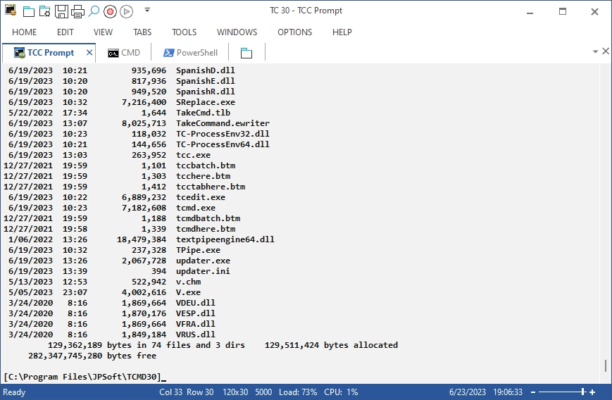
Unlike the traditional CMD window, Take Command provides a tabbed console interface with an integrated file explorer and a powerful text editor for creating and debugging batch files.
It allows you to execute commands faster, manage multiple command sessions simultaneously, and use over 200 built-in commands that go far beyond what the Windows Command Prompt offers.
Key Features of JP Software Take Command 35.00.19
🧩 Advanced Command Line Interface
Take Command replaces the old CMD window with a modern, customizable tabbed interface. You can run multiple command prompts in tabs, organize them in groups, and switch between them easily.
⚙️ Enhanced Batch File Support
This version offers robust support for batch scripting, allowing you to write, edit, and debug scripts directly inside the program. The built-in syntax highlighting and error detection features help developers quickly identify issues.
🗂️ Integrated File Explorer
The integrated file explorer makes it easy to navigate directories, drag and drop files, and execute commands on them directly. This makes managing your system faster and more efficient than ever before.
🧠 Powerful Scripting Language
Take Command extends the traditional command syntax with hundreds of new commands, variables, and internal functions. It supports complex logic, looping, and file manipulation — perfect for automation and advanced administration tasks.
📜 Customizable Aliases and Macros
Save time by creating command aliases and macros for repetitive tasks. You can define shortcuts for long commands or automate entire sequences with a single line of code.
💡 Enhanced Output Control
The program allows users to colorize command output, filter results, and redirect data more effectively. This is especially helpful for IT professionals analyzing system logs or running diagnostic scripts.
What’s New in Version 35.00.19?
The latest version of Take Command brings multiple performance improvements and new features:
Faster command execution engine for smoother performance.
Improved scripting compatibility with PowerShell and other interpreters.
Enhanced tab management, including detachable windows.
New debugging tools for script developers.
Security improvements and updated documentation.
Why Choose Take Command Over CMD or PowerShell?
While CMD is simple and limited, and PowerShell is powerful but often complex, Take Command offers the perfect balance — simplicity for beginners and advanced functionality for experts.
It bridges the gap between graphical file management and command line control, giving users a flexible hybrid interface that enhances productivity.
System Requirements
Operating System: Windows 10 / 11 / Server 2016 or later
Processor: Intel or AMD 1 GHz or higher
RAM: 2 GB minimum
Disk Space: 200 MB available space
Conclusion
JP Software Take Command 35.00.19 is the ultimate upgrade for anyone who relies on command-line tools.
It transforms the traditional Windows command prompt into a modern, powerful, and user-friendly environment designed for professionals.
Whether you manage servers, automate tasks, or write scripts, Take Command will make your daily workflow faster, more organized, and more enjoyable.
🔗 Official Website:https://jpsoft.com/take-command.html
✔ Tested: This software was tested on Windows 10 & Windows 11 and works smoothly without issues.
Frequently Asked Questions
- Is this software free?
Yes, it can be downloaded and used for free. - Does it support Windows 11?
Yes, it works perfectly on Windows 10 and 11. - Is it safe to use?
Yes, the software was scanned and tested before publishing.
Last updated: January 2026