ExtraDisks 25.10.1: Take Full Control of Your Multi-Drive Windows PC 🖥️💽
Do you use multiple hard drives, SSDs, or external USB drives on your Windows PC? Keeping track of which drive is which—especially when they all appear as “Local Disk (D:)” or “Removable Disk (F:)”—can be frustrating. ExtraDisks 25.10.1 solves this with a simple, elegant solution: assign custom names, icons, and colors to every drive—so you always know where your data lives.
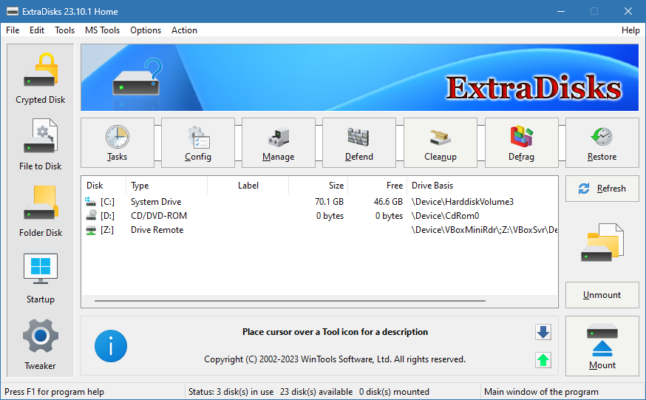
Lightweight, free, and portable, ExtraDisks is the perfect utility for power users, content creators, backup managers, and anyone juggling multiple storage devices.
🎯 Why Use ExtraDisks?
- ✅ Rename drives permanently (beyond Windows’ 11-character limit)
- ✅ Assign custom icons & colors to each disk
- ✅ Works with internal HDDs/SSDs, USB drives, SD cards, and network drives
- ✅ No admin rights or installation needed (portable version available)
- ✅ Zero background processes – runs only when you need it
Unlike Windows’ basic “Rename” function, ExtraDisks uses autorun.inf and system tricks to display your custom labels everywhere—File Explorer, desktop, open/save dialogs, and more.
✨ Key Features of Version 25.10.1
🏷️ 1. Unlimited Drive Labeling
- Give drives long, descriptive names like “Photos Archive 2025” or “Game Library – Steam”
- Bypass Windows’ default short labels (e.g., “OS”, “DATA”)
- Labels appear consistently across all Windows interfaces
🎨 2. Custom Icons & Visual Tags
- Choose from built-in icons or use your own (.ico files)
- Apply color-coded tags (red for backups, green for media, etc.)
- Instant visual recognition at a glance
💾 3. Supports All Storage Types
- Internal drives (SATA, NVMe)
- External USB HDDs/SSDs
- SD/microSD cards
- Mapped network drives (with limitations)
⚙️ 4. Simple & Safe Operation
- One-click apply
- Undo changes anytime
- No registry hacks or system file modifications
- Fully reversible
📦 5. Portable & Lightweight
- Single EXE file (<2 MB)
- Run from USB drive
- No installation or leftovers
🛠️ Ideal For:
- Photographers & Videographers: Label drives by project or year
- Gamers: Identify game library drives instantly
- Backup Users: Clearly mark “Daily Backup”, “Monthly Archive”, etc.
- IT Technicians: Organize test or client drives in the field
- Home Users: Stop guessing which “Local Disk” is which!
💡 Tip: Use ExtraDisks after formatting a new drive to give it a meaningful identity from day one.
🆚 ExtraDisks vs. Manual Windows Renaming
ExtraDisks turns drive chaos into clarity—with zero complexity.
💡 Final Thoughts: Know Your Drives at a Glance
ExtraDisks 25.10.1 proves that sometimes, the smallest tools make the biggest difference. By giving you visual control over your storage, it eliminates confusion, saves time, and brings order to your digital workspace.
💾 Label it. Color it. Own it.
🌐 Official website & free download: https://www.extradisks.com
💻 Works on Windows 7, 8, 10, 11 (32-bit & 64-bit) – 100% free, no ads, no telemetry.
✔ Tested: This software was tested on Windows 10 & Windows 11 and works smoothly without issues.
Frequently Asked Questions
- Is this software free?
Yes, it can be downloaded and used for free. - Does it support Windows 11?
Yes, it works perfectly on Windows 10 and 11. - Is it safe to use?
Yes, the software was scanned and tested before publishing.
Last updated: January 2026