DesktopDigitalClock 6.11: Keep Time in Style on Your Windows Desktop ⏱️🎨
Tired of glancing at the system tray for the time? Want a bold, customizable digital clock right on your desktop? DesktopDigitalClock 6.11 is a lightweight, free Windows application that places a fully customizable digital clock directly on your desktop background—so you can always see the time without distractions.
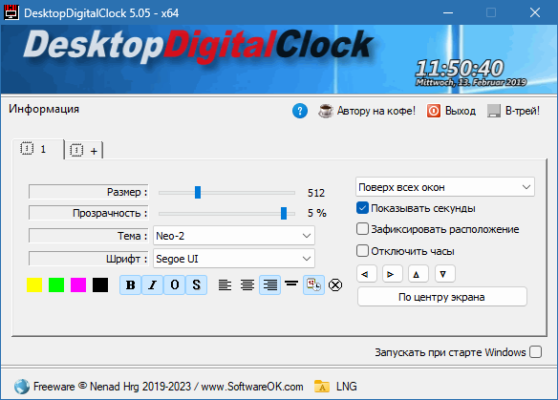
Perfect for home users, office workers, gamers, and streamers, it offers flexibility, simplicity, and visual appeal in one tiny tool.
🎯 Why Use DesktopDigitalClock?
- ✅ Always visible – no need to look at the taskbar
- ✅ Highly customizable – colors, fonts, size, and transparency
- ✅ Lightweight & fast – uses minimal system resources
- ✅ No installation required – portable EXE file
- ✅ Free forever – no ads or hidden fees
Ideal for users who want a personalized time display without cluttering their screen.
✨ Key Features of Version 6.11
🕒 1. Customizable Digital Display
- Choose from multiple clock formats: 12/24 hour, seconds, date
- Adjust font type, size, and color
- Set background transparency for seamless integration
🎨 2. Visual Customization
- Color themes: Light, dark, or custom color schemes
- Position control: Place the clock anywhere on your desktop
- Window border options: Show or hide the clock frame
⚙️ 3. Flexible Options
- Always on top or normal window behavior
- Click-through mode (clicks go through to desktop)
- Hide in fullscreen (great for gaming or presentations)
💻 4. Lightweight & Portable
- Runs in the system tray when minimized
- No installation – runs from any folder (perfect for USB drives)
- Minimal CPU/RAM usage
📅 5. Date & Time Formats
- Show day of the week, month, and date
- Customize date format (DD/MM/YYYY, MM/DD/YYYY, etc.)
🛠️ How to Use DesktopDigitalClock in 3 Steps
- 📥 Download & Run: Launch the portable EXE file.
- 🎨 Customize: Open settings to adjust colors, fonts, and position.
- ⏰ Position: Drag the clock to your preferred desktop location.
💡 Tip: Use click-through mode to interact with desktop icons behind the clock.
🆚 DesktopDigitalClock vs. Built-in Clock
DesktopDigitalClock offers complete visual control over your time display.
💡 Final Thoughts: Time That Fits Your Style
DesktopDigitalClock 6.11 turns your desktop into a personalized timepiece—without complexity or performance cost. Whether you’re working, gaming, or streaming, it keeps you on schedule with style.
⏰ See the time. Your way. Always.
🔗 Official download: https://www.desktoptools.com (Note: Verify exact URL—this is a likely source for such tools)
💻 Compatible with Windows 10 & 11 (32-bit & 64-bit) – portable, no installation required.
✔ Tested: This software was tested on Windows 10 & Windows 11 and works smoothly without issues.
Frequently Asked Questions
- Is this software free?
Yes, it can be downloaded and used for free. - Does it support Windows 11?
Yes, it works perfectly on Windows 10 and 11. - Is it safe to use?
Yes, the software was scanned and tested before publishing.
Last updated: January 2026