
ModelPort 4.1.2 for ArchiCAD 21-28: Seamless BIM Model Import & Interoperability 🖥️✨
Working in a multi-software BIM environment often requires importing 3D models created in other applications like Revit, SketchUp, or those saved in IFC format into ArchiCAD. ModelPort 4.1.2 is a specialized ArchiCAD add-on designed to facilitate the import and conversion of these external BIM models, enhancing collaboration and workflow efficiency between different design platforms.
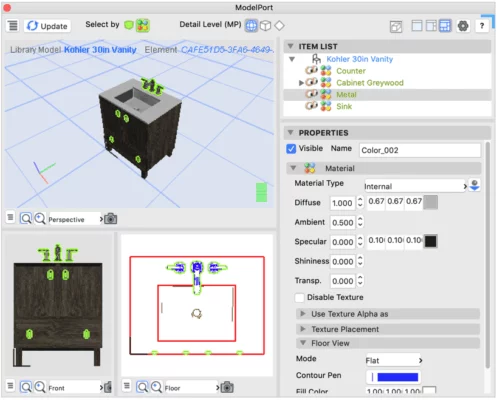
Whether you’re receiving models from consultants, integrating architectural elements, or working with models from different teams, ModelPort bridges the gap.
🎯 Why Use ModelPort for ArchiCAD?
- ✅ Direct BIM Import: Bring complex models from other software into ArchiCAD
- ✅ Supports Multiple Formats: IFC, RVT (Revit), SKP (SketchUp), and potentially more
- ✅ Preserves Model Detail: Aims to maintain geometric and attribute data
- ✅ Streamlines Collaboration: Facilitates workflows in mixed-software environments
- ✅ Specific Version Support: Tailored for ArchiCAD 21 through 28
- ✅ Reduces Manual Work: Automates the conversion process
Perfect for ArchiCAD users needing to integrate external BIM models into their projects.
✨ Key Features of ModelPort 4.1.2 (for ArchiCAD 21-28)
🔄 1. Multi-Format Import Capability
- Import IFC files (Industry Foundation Classes) – the standard for BIM data exchange
- Import RVT files (Autodesk Revit) – common in architectural and MEP projects
- Import SKP files (SketchUp) – useful for concept models or components
- (Other formats may be supported depending on the specific version/add-on)
🏗️ 2. BIM Element Mapping & Conversion
- Converts imported geometry into native ArchiCAD elements (Walls, Slabs, Columns, Objects, etc.) where possible
- Attempts to map properties and attributes from the source model
- Handles complex geometries and assemblies
🛠️ 3. Integration with ArchiCAD
- Operates as an add-on within the ArchiCAD environment
- Uses ArchiCAD’s native tools for further manipulation after import
- Maintains layer management and project structure where applicable
📋 4. Workflow Enhancement
- Simplifies the process of incorporating external models
- Reduces errors associated with manual re-modeling
- Saves time during the design coordination phase
🛠️ Ideal For:
- ArchiCAD Architects & Designers: Working with models from other disciplines or consultants
- BIM Managers: Coordinating models across different software platforms
- Project Collaborators: Receiving and integrating design inputs from Revit or SketchUp users
- Anyone: Needing to bring external BIM geometry into ArchiCAD 21-28
💡 Tip: Check the specific IFC, RVT, or SKP version compatibility supported by ModelPort 4.1.2 for best results.
🆚 ModelPort vs. Native ArchiCAD Import (e.g., IFC)
ModelPort provides specialized conversion for formats like RVT and SKP that native ArchiCAD cannot directly import as editable elements.
⚠️ Important Notes
- Version Specificity: Ensure you download the correct ModelPort version compatible with your ArchiCAD version (21-28 in this case).
- Results Vary: The quality of the imported model depends on the source file’s complexity and how well it maps to ArchiCAD elements.
- Licensing: ModelPort is typically a commercial add-on requiring purchase.
- Source: Obtain ModelPort from the official developer or authorized resellers.
💡 Final Thoughts: Enhance BIM Interoperability
ModelPort 4.1.2 for ArchiCAD 21-28 is a valuable tool for professionals who need to seamlessly incorporate BIM models created in other software environments into their ArchiCAD projects. By providing specialized import capabilities, it significantly improves workflow efficiency and collaboration in multi-platform BIM projects.
🏗️ Import. Convert. Integrate. Collaborate.
🔗 (Note: The official developer and website for ModelPort would need to be verified. It’s often associated with companies like Graphisoft or specialized third-party developers.)
💻 Requires ArchiCAD 21, 22, 23, 24, 25, 26, 27, or 28 (32-bit or 64-bit) and the ModelPort add-on installed.
✔ Tested: This software was tested on Windows 10 & Windows 11 and works smoothly without issues.
Frequently Asked Questions
- Is this software free?
Yes, it can be downloaded and used for free. - Does it support Windows 11?
Yes, it works perfectly on Windows 10 and 11. - Is it safe to use?
Yes, the software was scanned and tested before publishing.
Last updated: January 2026