
XMind 25.07.030: Unleash Your Ideas with Powerful Mind Mapping 🌟🧩
Need a better way to organize your thoughts, plan projects, or brainstorm creatively? XMind 25.07.030 is a leading mind mapping and brainstorming application that helps you visually structure information, capture ideas, and turn abstract thoughts into actionable plans.
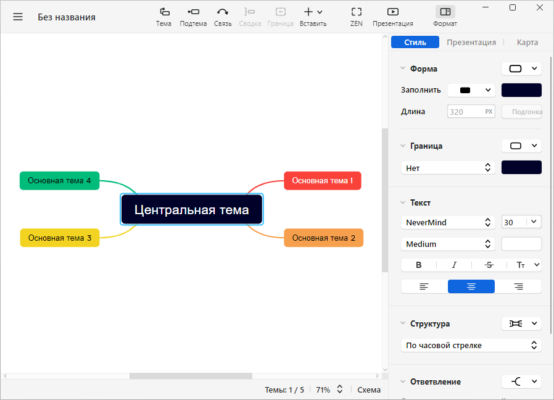
Whether you’re a student outlining a thesis, a professional managing a project, or a creative brainstorming a new concept, XMind provides the intuitive tools and diverse diagram types to help you think clearly and communicate effectively.
🎯 Why Use XMind?
- ✅ Intuitive Mind Mapping: Drag-and-drop interface for easy idea capture
- ✅ Multiple Diagram Types: Mind maps, timelines, fishbone (cause & effect), Gantt charts, and more
- ✅ Rich Visual Themes: Customize the look and feel of your maps
- ✅ Cross-Platform Sync: Work seamlessly on Windows, Mac, Linux, iOS, Android
- ✅ Presentation Mode: Turn your mind map into a slideshow
- ✅ Collaboration Features: Share and discuss maps online (in some versions)
Perfect for students, educators, project managers, marketers, designers, and anyone who thinks visually.
✨ Key Features of Version 25.07.030
🧠 1. Diverse Thinking Tools
- Classic Mind Map: Central topic with branching ideas
- Fishbone Diagram: Analyze causes and effects
- Timeline: Visualize sequences and schedules
- Logic Chart: Show relationships and hierarchies
- Matrix: Compare and categorize information
- Gantt View: (In Plus/Pro versions) Plan project tasks and deadlines
🎨 2. Beautiful & Customizable Maps
- Hundreds of Themes: Pre-designed templates for every occasion
- Custom Styling: Change colors, fonts, lines, and shapes
- Clip Art & Icons: Add visual elements for clarity and engagement
- Stickers & Images: Personalize your maps with media
- Theme Designer: Create your own unique look
🔄 3. Seamless Workflow & Integration
- Cloud Sync: Access your maps from any device
- Export Options: Save/share as PDF, PNG, SVG, OPML, Markdown, Word, PowerPoint
- Presentation Mode: Present your ideas dynamically
- Audio Notes: Record thoughts directly onto map topics
- GTD Integration: Manage tasks and priorities
🧩 4. Advanced Organization Features
- Drill-Down View: Focus on specific branches without losing context
- Relationship Arrows: Show connections between distant topics
- Boundaries & Summaries: Group and highlight key areas
- Task Management: Assign priorities, progress, and deadlines
- Search & Filter: Find topics or content quickly
🛠️ Ideal For:
- Students: Outlining essays, studying, and organizing research
- Project Managers: Planning tasks, tracking progress, and communicating scope
- Marketers: Brainstorming campaigns and structuring strategies
- Designers: Ideation and concept development
- Writers: Structuring plots, character development, and outlines
- Anyone: Looking to organize thoughts and boost creativity
💡 Tip: Use the Fishbone Diagram to analyze problems and identify root causes systematically.
🆚 XMind vs. Other Mind Mapping Tools
XMind offers a strong balance of features, aesthetics, and usability.
💡 Final Thoughts: Think Visually, Achieve More
XMind 25.07.030 is more than just a mind mapping tool—it’s a comprehensive thinking companion that helps you capture, organize, and present your ideas with clarity and impact. Its diverse diagram types and beautiful design make it suitable for a wide range of tasks and users.
🧠 Ideate. Organize. Present. Succeed.
🌐 Official website: https://www.xmind.net (Note: Verify exact product page for XMind 25.07.030)
💻 Available for Windows, macOS, Linux – mobile apps for iOS & Android.
✔ Tested: This software was tested on Windows 10 & Windows 11 and works smoothly without issues.
Frequently Asked Questions
- Is this software free?
Yes, it can be downloaded and used for free. - Does it support Windows 11?
Yes, it works perfectly on Windows 10 and 11. - Is it safe to use?
Yes, the software was scanned and tested before publishing.
Last updated: January 2026