
PDQ Inventory 19.5.0 – Advanced Windows System Management & Network Inventory Tool
PDQ Inventory 19.5.0 is a comprehensive system management solution designed to simplify the process of monitoring and managing Windows-based networks. It enables IT administrators to collect detailed information about hardware, software, and configurations from all computers in their organization — all in real time. Whether you’re running a small office network or managing hundreds of workstations, PDQ Inventory gives you instant insight into your entire IT environment.
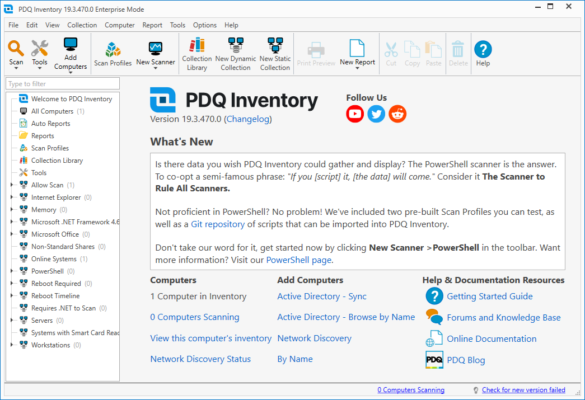
Developed by PDQ.com, this tool is a favorite among system administrators thanks to its speed, reliability, and deep integration with other PDQ products such as PDQ Deploy. It’s built to automate IT management tasks, reduce human error, and improve efficiency.
Key Features of PDQ Inventory 19.5.0
Automatic Network Scanning:
PDQ Inventory scans all computers on your network and gathers detailed system information — including hardware specs, installed software, OS versions, and patch levels.Dynamic Collections:
Automatically group computers based on shared attributes. For example, you can create a collection for all machines with outdated software or missing Windows updates.Instant Remote Access:
Quickly connect to any workstation via Remote Desktop, PowerShell, or Command Prompt directly from the PDQ console.Custom Reports:
Generate detailed reports about your infrastructure — such as installed software lists, system updates, or disk space usage — and export them in multiple formats for audits or compliance tracking.Smart Filters & Queries:
Use advanced filtering to locate specific machines or users based on any parameter — from operating system version to CPU type or security patch status.Integration with PDQ Deploy:
Combine PDQ Inventory with PDQ Deploy for full automation. You can automatically deploy software or updates to specific collections identified in PDQ Inventory.Real-Time Alerts:
Stay informed about system changes, software installations, or hardware failures with instant notifications.Secure & Centralized Database:
All collected data is stored in a secure central database, ensuring accuracy and quick access.
What’s New in PDQ Inventory 19.5.0
The latest version introduces significant improvements in both performance and compatibility:
Faster scanning engine with lower CPU usage
Improved Windows 11 and Server 2025 support
Enhanced Active Directory synchronization
More reliable PowerShell integration
Better filtering and search options
These enhancements make PDQ Inventory even more efficient and responsive when managing modern enterprise environments.
System Requirements
Operating System: Windows 10, 11, or Windows Server 2016+
Processor: 1.4 GHz or faster
RAM: Minimum 2 GB (4 GB recommended)
Disk Space: At least 1 GB free
Database: Built-in SQL Compact or full SQL Server support
How to Use PDQ Inventory 19.5.0
Download and Install PDQ Inventory from the official website.
Launch the program and allow it to scan your network automatically.
View real-time data for each computer in your organization.
Organize devices into collections based on dynamic criteria.
Create and export reports or integrate with PDQ Deploy for automation.
Benefits of Using PDQ Inventory
Comprehensive visibility across your entire network
Streamlined IT administration and troubleshooting
Automated software tracking and compliance reporting
Secure data collection and management
Seamless integration with other PDQ tools
PDQ Inventory 19.5.0 is designed to save administrators hours of manual work by automating repetitive tasks and centralizing all system information in one intuitive dashboard.
Conclusion
PDQ Inventory 19.5.0 is an essential tool for any IT department that needs to monitor, maintain, and secure Windows environments efficiently. With its intelligent scanning, powerful reporting, and automation capabilities, it offers complete control and visibility over your network assets. If you want to simplify IT management and eliminate guesswork, PDQ Inventory is the tool you need.
Official Website:
https://www.pdq.com/pdq-inventory/
✔ Tested: This software was tested on Windows 10 & Windows 11 and works smoothly without issues.
Frequently Asked Questions
- Is this software free?
Yes, it can be downloaded and used for free. - Does it support Windows 11?
Yes, it works perfectly on Windows 10 and 11. - Is it safe to use?
Yes, the software was scanned and tested before publishing.
Last updated: January 2026