
⚡ Overview of SAPIEN PowerShell Studio 2025 v5.9.260
SAPIEN PowerShell Studio 2025 v5.9.260 is the most advanced integrated development environment (IDE) for PowerShell professionals. Designed by SAPIEN Technologies, it empowers IT administrators, DevOps engineers, and automation specialists to build, test, and package PowerShell scripts with unmatched speed and efficiency.
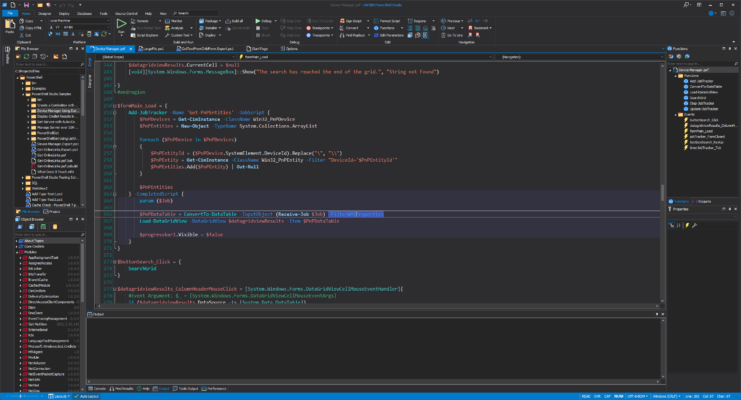
PowerShell Studio provides a rich editing environment, visual tools for creating GUIs, and features for managing modules and projects — making it the go-to solution for anyone who works extensively with PowerShell automation.
Whether you’re writing scripts for Windows administration, system configuration, or cloud management, PowerShell Studio 2025 offers the performance, flexibility, and reliability you need.
🧠 Why Choose PowerShell Studio 2025
PowerShell Studio is more than just a text editor — it’s a complete PowerShell development platform. It simplifies the process of writing and maintaining scripts by combining advanced coding tools with automation and GUI creation features.
Key Advantages:
✅ Full-featured PowerShell IDE
✅ Syntax highlighting, IntelliSense, and debugging support
✅ Visual GUI Designer for creating Windows Forms applications
✅ Script packaging and executable creation
✅ Source control integration (Git, SVN, etc.)
✅ Code signing and version management
✅ Module and function explorer for large projects
🧩 What’s New in Version 5.9.260
The 2025 release of PowerShell Studio introduces several performance improvements and modern development features:
🚀 Enhanced script editor with better IntelliSense and auto-completion
🧰 Updated GUI designer with new Windows 11 controls
⚙️ Improved performance for large project builds
🧑💻 Integrated PowerShell 7.4 support
🔍 Refined debugging engine with breakpoints and variable tracking
📦 Better packaging of scripts into executables (EXE)
🧾 Updated templates for faster GUI and module creation
These updates ensure PowerShell Studio remains the most powerful and modern IDE for PowerShell development.
🛠️ Core Features
1️⃣ Advanced Script Editor
The editor includes intelligent code completion, syntax coloring, and real-time error checking to improve productivity and reduce mistakes. Developers can easily navigate functions, variables, and classes using the built-in object browser.
2️⃣ Visual Form Designer
Build rich Windows GUIs for PowerShell scripts using drag-and-drop components. The form designer automatically generates clean PowerShell code that can be customized and extended manually.
3️⃣ Script Debugger
Debug PowerShell scripts interactively, set breakpoints, and inspect variables. This ensures stable, predictable behavior across different environments.
4️⃣ Script Packager
Convert PowerShell scripts into standalone executable files (EXE) for easy distribution. You can embed resources, sign executables, and protect your source code from tampering.
5️⃣ Version Control & Collaboration
Seamlessly integrate with Git or SVN for collaborative development and version tracking. Keep your scripts synchronized across multiple environments and team members.
🧰 Ideal Use Cases
System Administrators: Automate tasks, manage servers, and streamline workflows.
DevOps Engineers: Deploy scripts, monitor infrastructure, and integrate automation pipelines.
Developers: Create GUI-based PowerShell tools for end-users.
IT Departments: Manage company-wide PowerShell script libraries with centralized versioning.
💻 System Requirements
OS: Windows 10, 11 (64-bit)
Processor: Dual-core 2 GHz or higher
Memory: 4 GB RAM minimum (8 GB recommended)
Storage: 500 MB free disk space
PowerShell: Version 5.1 or later (supports PowerShell 7.x)
🔐 Security and Code Integrity
PowerShell Studio supports code signing for ensuring the integrity and authenticity of scripts. Signed scripts help prevent execution of unauthorized or tampered code — an essential security practice for enterprise environments.
Additionally, you can package sensitive scripts into executables with optional password protection and encryption.
🧩 Integration with PowerShell Ecosystem
PowerShell Studio integrates seamlessly with the Microsoft ecosystem, allowing developers to build tools that interact with Azure, Active Directory, Microsoft 365, and Windows Management Instrumentation (WMI).
Its module manager makes importing, editing, and publishing custom modules straightforward, empowering teams to create reusable automation components.
🏁 Final Thoughts
SAPIEN PowerShell Studio 2025 v5.9.260 remains the industry-leading IDE for PowerShell professionals. It combines power, simplicity, and flexibility — helping you create reliable, maintainable, and efficient automation scripts faster than ever before.
Whether you’re a system administrator automating repetitive tasks or a developer building enterprise-grade tools, PowerShell Studio 2025 gives you everything you need in one polished interface.
✔ Tested: This software was tested on Windows 10 & Windows 11 and works smoothly without issues.
Frequently Asked Questions
- Is this software free?
Yes, it can be downloaded and used for free. - Does it support Windows 11?
Yes, it works perfectly on Windows 10 and 11. - Is it safe to use?
Yes, the software was scanned and tested before publishing.
Last updated: January 2026