
Topaz Sharpen AI 4.1.0 – Restore True Sharpness and Detail with AI Precision
Blurry or soft photos can ruin even the best shots — whether caused by camera shake, focus errors, or motion blur.
Topaz Sharpen AI 4.1.0, developed by Topaz Labs, uses advanced artificial intelligence to bring your photos back to life with stunning clarity and precision.
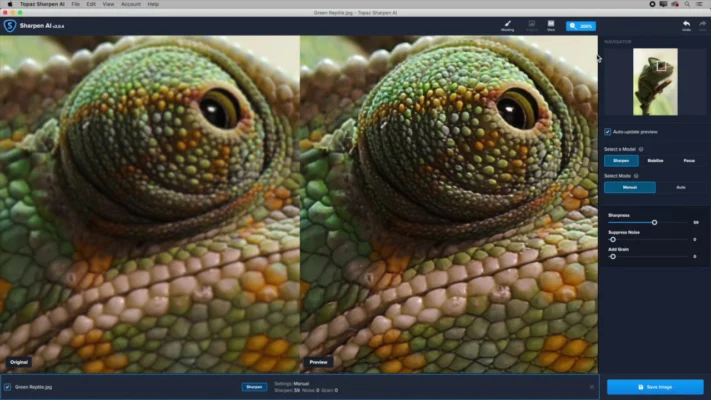
This latest version delivers state-of-the-art image sharpening that intelligently identifies and corrects blur without over-sharpening or introducing artifacts. It’s the perfect solution for photographers who want every image to look perfectly crisp.
🤖 What Makes Topaz Sharpen AI Different?
Traditional sharpening tools increase contrast around edges, often creating halos or noise.
Sharpen AI, on the other hand, uses deep learning trained on millions of real-world images to understand how blur occurs — and how to reverse it naturally.
The result is a balanced, realistic photo with preserved texture, natural edges, and enhanced definition.
⚙️ Key Features of Topaz Sharpen AI 4.1.0
🧠 Intelligent Blur Correction
The software automatically detects the type of blur — whether motion, focus, or general softness — and applies the best model to fix it.
Each pixel is analyzed to restore detail while maintaining accurate lighting and color.
🪄 Three AI Modes for Perfect Results
Sharpen Mode: For slightly soft images that need gentle enhancement.
Stabilize Mode: Fixes motion blur caused by handheld shots or camera shake.
Focus Mode: Corrects out-of-focus images with remarkable precision.
These modes ensure consistent, professional-grade results for any type of photo.
📸 RAW & High-Resolution Support
Sharpen AI supports RAW, TIFF, JPEG, and PNG formats with full color accuracy.
Whether you’re editing a 12MP JPEG or a 100MP RAW photo, it retains the original dynamic range and detail.
⚡ GPU-Accelerated Performance
Optimized for NVIDIA, AMD, and Apple Silicon GPUs — offering up to 5x faster rendering speeds compared to previous versions.
🧩 Plugin & Standalone Flexibility
Use it as a standalone app or integrate it directly with Adobe Photoshop, Lightroom, or Capture One.
This allows for seamless workflow integration for both professionals and hobbyists.
🆕 What’s New in Version 4.1.0
The latest Topaz Sharpen AI 4.1.0 brings major improvements to performance and AI quality:
Enhanced AI models for more accurate edge definition
Better motion blur correction for handheld photography
Faster processing with optimized GPU utilization
Improved batch editing stability
Updated UI for smoother navigation
This update makes version 4.1.0 the most refined, reliable, and intelligent release of Sharpen AI yet.
💡 When to Use Sharpen AI
📷 Portraits: Restore subtle eye and hair detail
🌄 Landscapes: Recover texture and fine edges in natural scenes
🏎️ Sports & Action Shots: Fix motion blur in fast-moving subjects
🌙 Night Photography: Enhance low-light shots without adding noise
🖼️ Old or Scanned Photos: Restore lost detail and clarity
No matter the shooting condition, Sharpen AI ensures every pixel is sharp and lifelike.
🛠️ System Requirements
OS: Windows 10/11 (64-bit) or macOS 10.15+
CPU: Intel i5 or AMD Ryzen 5 and above
RAM: 8GB (16GB recommended)
GPU: NVIDIA GTX 1050 / AMD equivalent or better
Disk Space: 3GB minimum
🌟 Why Choose Topaz Sharpen AI?
✅ Industry-leading AI sharpening engine
🧠 Smart distinction between noise and real detail
🖼️ Professional-grade results with natural textures
🚀 Optimized GPU performance for faster editing
💡 Easy to use for both amateurs and professionals
Topaz Sharpen AI 4.1.0 turns blurry images into sharp, magazine-quality photos with just a few clicks — no manual masking or complex adjustments needed.
🔚 Final Thoughts
For photographers who demand perfection, Topaz Sharpen AI 4.1.0 is the ultimate tool to restore clarity, fix blur, and enhance image quality intelligently.
It’s not just a sharpening app — it’s an AI-powered photo restoration solution that delivers professional results every time.
If clarity, precision, and realism matter to you, this version is a must-have in your editing toolkit.
🔗 Official Website:https://www.topazlabs.com/sharpen-ai
✔ Tested: This software was tested on Windows 10 & Windows 11 and works smoothly without issues.
Frequently Asked Questions
- Is this software free?
Yes, it can be downloaded and used for free. - Does it support Windows 11?
Yes, it works perfectly on Windows 10 and 11. - Is it safe to use?
Yes, the software was scanned and tested before publishing.
Last updated: January 2026