Office Tab Enterprise 18.00: Bring Browser-Style Tabs to Microsoft Office 🖥️✨
Working with multiple Microsoft Office documents simultaneously can quickly become confusing and inefficient. Switching between windows, losing track of open files, and managing scattered windows slows down productivity. Office Tab Enterprise 18.00 solves this by adding a familiar tabbed interface to Word, Excel, PowerPoint, Outlook, Publisher, Access, Project, Visio, and other Office applications—just like modern web browsers.
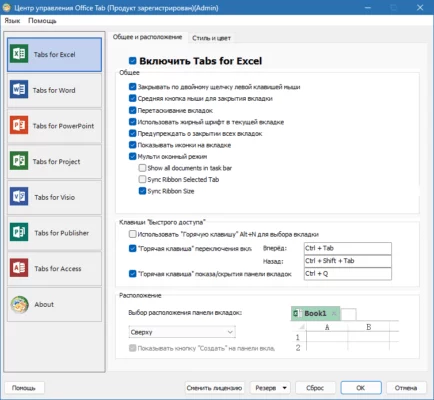
Transform your Office experience into a streamlined, tabbed workflow for maximum efficiency and organization.
🎯 Why Use Office Tab Enterprise?
- ✅ Adds browser-like tabs to Office applications
- ✅ Switch between documents instantly with a click
- ✅ Reduces desktop clutter by consolidating windows
- ✅ Saves time by eliminating window management
- ✅ Increases productivity for multi-document workflows
- ✅ Compatible with all major Office apps (Word, Excel, PowerPoint, etc.)
Perfect for office workers, students, writers, analysts, and anyone managing multiple Office files.
✨ Key Features of Version 18.00
📑 1. Tabbed Interface for Office
- Intuitive tab bar appears in supported Office applications
- Open, close, move, and pin tabs as needed
- Visual separation of different documents within one window
⚡ 2. Enhanced Navigation
- Quickly switch between open documents using tabs
- Right-click context menu for tab management (duplicate, close others, etc.)
- Keyboard shortcuts for efficient tab handling
🔄 3. Multi-Document Management
- Open multiple files in a single application window
- Easily compare or copy data between documents
- Reduce taskbar clutter and minimize confusion
🛠️ 4. Customization Options
- Adjust tab appearance (position, size, color)
- Configure behavior (auto-hide, double-click to close, etc.)
- Integrate with Office themes for a consistent look
🧩 5. Seamless Integration
- Works with existing Office installations
- No changes required to your current workflow
- Compatible with Office 2007 through Office 365 (versions supported by the plugin)
🛠️ Ideal For:
- Business Professionals: Managing multiple reports, presentations, or spreadsheets
- Students: Working on various assignments simultaneously
- Writers: Juggling multiple documents or drafts
- Data Analysts: Comparing different Excel sheets
- Anyone: Seeking a more organized and efficient Office experience
💡 Tip: Use the “Pin Tab” feature to keep frequently accessed documents always visible.
🆚 Office Tab vs. Standard Office Windows
Office Tab provides a browser-like efficiency within the Office environment.
💡 Final Thoughts: Work Smarter in Office
Office Tab Enterprise 18.00 revolutionizes the way you interact with Microsoft Office by introducing the familiar, efficient tabbed interface. By reducing window management overhead and enabling instant document switching, it significantly boosts productivity for users handling multiple Office files.
📋 Open. Organize. Work Efficiently.
🌐 Official website: https://www.9bis.com/office-tab/ (Note: Verify exact product page for Office Tab Enterprise 18.00)
💻 Compatible with Windows and Microsoft Office (various versions).
✔ Tested: This software was tested on Windows 10 & Windows 11 and works smoothly without issues.
Frequently Asked Questions
- Is this software free?
Yes, it can be downloaded and used for free. - Does it support Windows 11?
Yes, it works perfectly on Windows 10 and 11. - Is it safe to use?
Yes, the software was scanned and tested before publishing.
Last updated: January 2026