QtScrcpy 3.3.1 Overview
QtScrcpy 3.3.1 is an advanced graphical user interface (GUI) for the popular open-source tool scrcpy, designed to mirror and control Android devices directly from your computer. It allows users to view their Android screens in real time, interact using mouse and keyboard, and even record device screens with minimal latency — all without the need for root access.
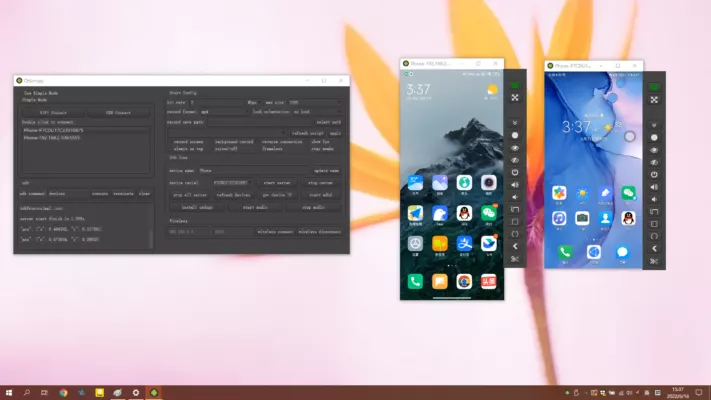
Developed using the Qt framework, QtScrcpy enhances the usability of scrcpy by providing a clean interface for managing multiple devices, recording sessions, and configuring advanced options easily.
Key Features of QtScrcpy 3.3.1
Real-Time Screen Mirroring
QtScrcpy offers ultra-low latency mirroring, enabling users to see their Android screen instantly on their PC. It’s ideal for app testing, gaming, or streaming your device display during presentations and tutorials.
Full Device Control
Interact with your Android device directly from your computer using a mouse and keyboard. You can open apps, type messages, control settings, and navigate the interface without touching the device.
High-Quality Screen Recording
The software allows you to record Android screens in real time with adjustable resolutions and bitrates, perfect for creating app demos, gameplay videos, or troubleshooting recordings.
Multi-Device Management
QtScrcpy supports connecting and controlling multiple Android devices simultaneously. Each device appears in its own tab, making it easy to manage several phones or tablets at once.
USB and Wireless Connection
You can connect your Android device via USB cable or over Wi-Fi for a wireless experience. Both modes offer smooth performance with minimal delay.
Customizable Settings
Users can configure video resolution, frame rate, orientation, display size, and window position. This flexibility makes it suitable for developers, gamers, and streamers.
Benefits of Using QtScrcpy 3.3.1
QtScrcpy simplifies Android screen mirroring and control, providing all features in a user-friendly interface that doesn’t require complex command-line operations. It’s especially beneficial for developers testing apps on multiple devices, content creators recording Android tutorials, and users who want to access their phones through their PC.
Because it doesn’t require root access, it’s safe and compatible with most Android versions. The optimized rendering ensures smooth visuals and responsive interaction, even at high frame rates.
Why Choose QtScrcpy 3.3.1
If you’re looking for a reliable and professional way to control your Android device from a Windows or Linux system, QtScrcpy 3.3.1 is the perfect choice. It combines the stability and power of scrcpy with the convenience of a graphical interface, eliminating the need for command-line use.
Its efficient performance, real-time mirroring, and advanced configuration options make it one of the best tools for Android control and screen recording available today.
In summary, QtScrcpy 3.3.1 delivers a smooth and feature-rich Android mirroring experience. With high-speed performance, recording options, and easy multi-device support, it’s an essential tool for developers, streamers, and power users who want seamless Android control directly from their PC.
✔ Tested: This software was tested on Windows 10 & Windows 11 and works smoothly without issues.
Frequently Asked Questions
- Is this software free?
Yes, it can be downloaded and used for free. - Does it support Windows 11?
Yes, it works perfectly on Windows 10 and 11. - Is it safe to use?
Yes, the software was scanned and tested before publishing.
Last updated: January 2026