
Overview of ILSpy 9.1
ILSpy 9.1 is a mature, open-source .NET decompiler and assembly browsing tool designed for developers, security researchers, and maintenance engineers. It lets you inspect compiled .NET assemblies (DLLs and EXEs), view decompiled C# code, analyze metadata, and explore resources embedded in assemblies. As a lightweight desktop application, ILSpy focuses on accuracy of decompilation, usability, and continuous improvements driven by an active community.
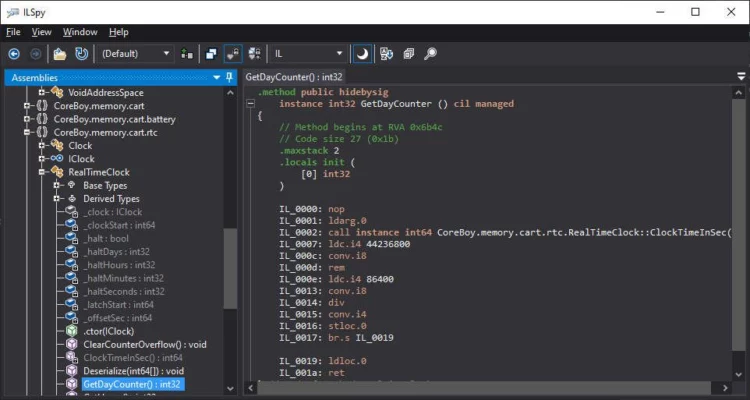
Whether you need to recover lost source snippets, audit third-party libraries, or understand the internals of a .NET app, ILSpy 9.1 provides a reliable, fast way to examine managed code without requiring the original project files.
Key Features
Accurate C# Decompilation
ILSpy 9.1 converts Microsoft intermediate language (MSIL) back into readable C# code with high accuracy. The decompiler handles modern C# language constructs, async/await patterns, and recent .NET runtime features, producing code that closely resembles original source patterns for easier comprehension.
Assembly Browsing and Metadata Inspection
Beyond decompilation, ILSpy includes a full assembly browser. You can explore namespaces, types, methods, properties, and custom attributes. The metadata viewer makes it simple to inspect manifests, referenced assemblies, and versioning information — essential for debugging and compatibility checks.
Plugin and Extension Support
ILSpy’s extensible architecture allows plugins to add features such as improved decompilation heuristics, project export, or integration with IDE workflows. This makes it adaptable for teams that need specialized analysis or want to automate repetitive inspection tasks.
Export and Project Generation
ILSpy 9.1 supports exporting decompiled assemblies into project formats or single-file representations, which helps when recovering fragments of lost code or reconstructing prototypes. Exported projects can serve as a starting point for refactoring or porting to newer frameworks.
Advanced Tools and Utilities
Search and Navigation
Powerful search tools let you find types, method calls, and string constants across loaded assemblies. Cross-reference navigation (find usages, go to definition) helps you trace execution paths and dependencies quickly.
Resource and IL Viewer
ILSpy includes viewers for embedded resources and raw IL (intermediate language). This is useful when you need to inspect resource files, embedded images, or when deeper bytecode-level understanding is required for auditing or optimization.
Debugging Aids
While ILSpy is not a debugger, it provides helpful context for debugging by revealing compiler-generated state machines, async transformations, and inlined methods that sometimes obscure intent in released builds.
Why Developers Choose ILSpy 9.1
Open Source and Community Driven
ILSpy’s open-source nature means transparency, regular updates, and community contributions. Security-conscious teams appreciate the ability to review the tool itself and to extend it without vendor lock-in.
Lightweight and Fast
ILSpy starts quickly and handles large assemblies with minimal overhead. It’s an excellent tool for quick inspections without the complexity of full IDE setups.
Legal and Ethical Use Cases
ILSpy is intended for legitimate scenarios: debugging, recovering your own code, auditing third-party libraries for security, and learning how frameworks behave. Users should always respect software licenses and intellectual property when decompiling third-party assemblies.
Getting the Most Out of ILSpy 9.1
Best Practices
Always use ILSpy for permitted tasks: inspect libraries you own or have permission to analyze. Combine ILSpy’s output with documentation and unit tests when reconstructing logic. Treat decompiled code as a reference — variable names and comments are typically lost in compilation, so manual review is necessary.
Integration Tips
Consider integrating ILSpy output with version control or exporting to a new project for gradual refactoring. Explore available plugins to match your workflow (e.g., symbol loading, enhanced syntax formatting, or IDE connectors).
Conclusion
ILSpy 9.1 remains a top choice for .NET developers who need a dependable decompiler and assembly inspector. It balances accuracy, speed, and extensibility while remaining community-driven and open source. Whether you’re recovering code, auditing dependencies, or learning implementation details of libraries, ILSpy 9.1 provides a clear window into compiled .NET applications — empowering developers to maintain, secure, and modernize their software effectively.
✔ Tested: This software was tested on Windows 10 & Windows 11 and works smoothly without issues.
Frequently Asked Questions
- Is this software free?
Yes, it can be downloaded and used for free. - Does it support Windows 11?
Yes, it works perfectly on Windows 10 and 11. - Is it safe to use?
Yes, the software was scanned and tested before publishing.
Last updated: January 2026