
Final2x v3.1.0 – Advanced AI Image Upscaling Made Simple
In the world of digital photography and design, image quality matters more than ever. Blurry or low-resolution pictures can ruin a project or social media post. Final2x v3.1.0 offers a revolutionary AI-powered solution to upscale images without losing quality. This tool combines deep-learning technology and fast performance to deliver sharp, detailed, and visually stunning results every time.
What Is Final2x v3.1.0?
Final2x v3.1.0 is an intelligent image upscaling software that uses artificial intelligence to enlarge photos while maintaining or even improving their quality. Unlike traditional upscalers that often blur details, Final2x restores textures, enhances edges, and boosts colors with precision.
This version introduces significant improvements in performance, GPU acceleration, and compatibility with multiple AI models. It’s designed for photographers, designers, game developers, and anyone who needs high-resolution visuals without sacrificing clarity.
Key Features
1. AI-Powered Image Upscaling
Final2x uses state-of-the-art neural networks to upscale images by up to 4x or more. It analyzes patterns and textures in every pixel, recreating missing details that traditional tools cannot recover.
2. Multiple AI Models Supported
The software includes several AI models such as Real-ESRGAN, SwinIR, and SRMD. Each model is optimized for different types of images—whether they are portraits, artwork, or anime. You can choose the best one depending on your project.
3. GPU Acceleration
Final2x v3.1.0 takes advantage of your GPU (NVIDIA, AMD, or Intel) to process images faster. This makes large-scale upscaling tasks quick and efficient, even for high-resolution images.
4. Batch Processing
Need to enhance multiple photos at once? Final2x allows batch processing, saving you hours of repetitive work. You can drop entire folders of images and let the software handle the rest automatically.
5. Enhanced Image Restoration
In addition to upscaling, Final2x can reduce noise, remove JPEG compression artifacts, and sharpen edges to make every image look clean and professional.
6. User-Friendly Interface
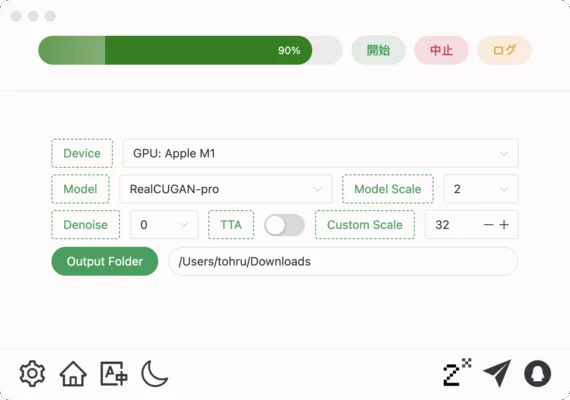
The clean and minimal design ensures that even beginners can use it effortlessly. Simply import your photo, select your model, choose an output scale, and click “Start.”
What’s New in Version 3.1.0
Improved AI Engine: Enhanced precision for complex image textures such as hair, fabric, and text.
Optimized Performance: Faster processing speed on both CPU and GPU.
New Preset Profiles: Easily select “Photo,” “Art,” or “Anime” for automatic settings adjustment.
Better Output Formats: Support for PNG, JPG, WEBP, and TIFF with customizable quality options.
Memory Optimization: Reduced resource consumption during large batch operations.
These upgrades make Final2x v3.1.0 one of the most efficient AI image upscalers available today.
How to Use Final2x v3.1.0
Open the Software – Launch Final2x and drag your image or folder into the window.
Select the AI Model – Choose the model best suited for your image type.
Set the Scale – Decide how much you want to enlarge (2x, 4x, or custom).
Choose Output Format – Pick your desired file type and destination folder.
Start the Process – Click “Start” and let the AI do the rest.
The result is a high-resolution, crystal-clear image ready for printing, publishing, or design work.
Why Choose Final2x v3.1.0?
Unlike online upscaling tools, Final2x works locally on your computer—ensuring privacy and faster processing. Its AI models are trained on thousands of high-resolution images, guaranteeing professional-level output. Whether you are restoring old photos, improving game textures, or enhancing product images, this tool delivers consistent and reliable results.
It’s also open and customizable, allowing power users to tweak model settings and processing modes for maximum control.
Final Thoughts
Final2x v3.1.0 is more than just an image enlarger—it’s a complete AI enhancement solution. It brings low-quality pictures back to life with realistic details and perfect sharpness. From photographers to digital artists, this version stands as a must-have tool for achieving stunning, high-resolution results.
✔ Tested: This software was tested on Windows 10 & Windows 11 and works smoothly without issues.
Frequently Asked Questions
- Is this software free?
Yes, it can be downloaded and used for free. - Does it support Windows 11?
Yes, it works perfectly on Windows 10 and 11. - Is it safe to use?
Yes, the software was scanned and tested before publishing.
Last updated: January 2026