In modern computing, multitasking has become an essential requirement. Having more than one display significantly improves productivity, whether for office tasks, gaming, or creative work. However, not everyone has access to multiple physical monitors. This is where spacedesk 2.1.23 comes into play. It allows you to extend or mirror your Windows desktop to other devices such as tablets, smartphones, or even another PC using Wi-Fi or LAN, providing a cost-effective second screen solution and buy.
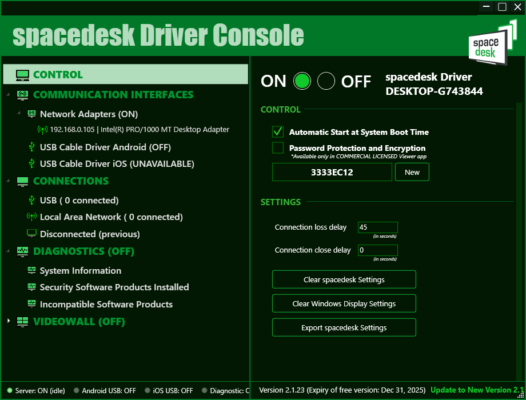
What is spacedesk 2.1.23?
spacedesk is a powerful display-sharing and screen-extension software for Windows. The version 2.1.23 brings stability improvements, better performance, and wider compatibility with modern devices. With spacedesk, you can transform almost any connected device into an additional monitor, making it highly versatile for professionals and casual users alike.
Key Features of spacedesk 2.1.23
Extend Display: Use your tablet, smartphone, or another computer as a second screen.
Mirror Display: Share your main screen with another device for presentations or remote work.
Cross-Platform Support: Works with Windows, Android, iOS, and HTML5 browsers.
Wi-Fi or LAN Connection: Connect devices wirelessly or via a local network for smooth performance.
Multi-Touch Support: Control your Windows PC directly from touch-enabled devices.
High-Resolution Streaming: Supports HD and Full HD for crisp visuals.
Free to Use: Unlike many competitors, spacedesk offers its core functionality at no cost.
System Requirements
To use spacedesk 2.1.23, you need the following setup:
Host PC (Windows): Windows 7, 8, 10, or 11 (32/64-bit)
Processor: Intel/AMD, 1.6 GHz or faster
RAM: 2 GB minimum
Network: Wi-Fi or Ethernet connection
Client Devices: Android, iOS, Windows, or browser with HTML5 support
How to Download and Install spacedesk 2.1.23
Go to the official spacedesk website.
Download the spacedesk DRIVER software for your Windows host PC.
Install the driver and restart your computer.
On your client device (tablet, smartphone, or PC), install the spacedesk VIEWER app from Google Play, App Store, or the official site.
Connect both devices to the same network (Wi-Fi or LAN).
Launch the viewer app and connect to your Windows host.
Choose whether to extend or mirror the display.
Why Use spacedesk 2.1.23?
For professionals, spacedesk can replace expensive multi-monitor setups by turning a tablet into a portable second screen. Gamers can use it to offload chat or monitoring tools to another device, while teachers and presenters can mirror content for a classroom or meeting. Its ease of use, cross-platform support, and reliability make it one of the best free solutions available today.
Conclusion
spacedesk 2.1.23 is a lightweight yet powerful display-extension tool for Windows users. It transforms smartphones, tablets, and PCs into additional monitors, enabling enhanced productivity and flexibility. With features like wireless connectivity, multi-touch support, and high-resolution streaming, it is an excellent choice for both professionals and casual users. Download spacedesk 2.1.23 today and enjoy a smarter way to work and play with multiple displays.
✔ Tested: This software was tested on Windows 10 & Windows 11 and works smoothly without issues.
Frequently Asked Questions
- Is this software free?
Yes, it can be downloaded and used for free. - Does it support Windows 11?
Yes, it works perfectly on Windows 10 and 11. - Is it safe to use?
Yes, the software was scanned and tested before publishing.
Last updated: January 2026