
When you need to merge several images into one file for presentations, comparisons, or creative projects, Batch Image Combiner Pro 1.3.0.4 offers a fast and professional solution. This software is designed to simplify image combination by allowing users to merge multiple pictures horizontally or vertically, all with customizable settings and high output quality.
What Is Batch Image Combiner Pro 1.3.0.4?
Batch Image Combiner Pro is a lightweight yet powerful tool for Windows that allows users to combine multiple images into a single file. Whether you’re creating product comparisons, photo collages, or design previews, this tool makes the process seamless.
Instead of using complicated image editors like Photoshop, you can merge images in seconds — saving time and maintaining the original image quality.
Key Features of Batch Image Combiner Pro 1.3.0.4
Batch Image Processing
Combine dozens or even hundreds of images simultaneously. The batch feature eliminates the need to merge images one by one, making it perfect for users handling large image collections.Horizontal and Vertical Combination Modes
Choose whether to align your images side by side or stack them vertically. The software provides full control over spacing, alignment, and dimensions.Custom Layout and Spacing
You can define the exact spacing between images, adjust margins, and set borders or background colors to achieve a polished, professional look.Supports Multiple Image Formats
The program supports popular formats like JPG, PNG, BMP, TIFF, and GIF, ensuring compatibility with all major image types.High-Quality Output
Unlike many other tools that reduce quality during merging, Batch Image Combiner Pro maintains the original resolution and sharpness of each image.Drag-and-Drop Interface
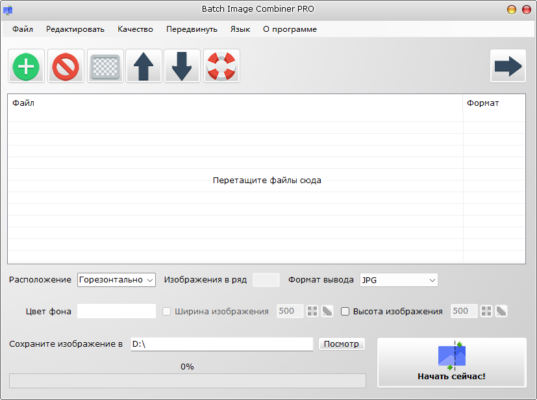
The user-friendly interface allows you to simply drag and drop images into the workspace, rearrange them easily, and preview results instantly.Automatic File Naming and Saving
Save time by using automatic output naming conventions or customize file names for organized batch exports.
Why Use Batch Image Combiner Pro 1.3.0.4?
Professionals, photographers, designers, and students all benefit from Batch Image Combiner Pro due to its simplicity and efficiency. Whether you’re merging screenshots for documentation or creating visual comparisons for e-commerce listings, this program delivers fast, reliable results.
In addition, its batch capability makes it ideal for businesses that handle large amounts of visual data — such as real estate, product catalogs, or digital marketing content.
How to Use Batch Image Combiner Pro
Open the application.
Add images by dragging them into the main window or selecting a folder.
Choose your combination mode (horizontal or vertical).
Adjust layout settings like spacing, margins, and background color.
Preview your results before saving.
Export the final combined image in your preferred format.
In just a few clicks, you’ll have a perfectly merged image ready for use.
System Requirements
Operating System: Windows 7, 8, 10, 11 (32-bit or 64-bit)
Processor: 1 GHz or faster
RAM: 1 GB or higher
Storage: 200 MB of free disk space
Final Thoughts
Batch Image Combiner Pro 1.3.0.4 is a must-have tool for anyone who frequently works with images. It combines simplicity, performance, and high-quality output, eliminating the need for complex graphic design tools.
Whether you’re merging a few photos for personal projects or processing hundreds of images professionally, this software ensures fast and accurate results every time.
It’s the perfect blend of efficiency, usability, and image quality — making it one of the best image merging tools available for Windows.
✔ Tested: This software was tested on Windows 10 & Windows 11 and works smoothly without issues.
Frequently Asked Questions
- Is this software free?
Yes, it can be downloaded and used for free. - Does it support Windows 11?
Yes, it works perfectly on Windows 10 and 11. - Is it safe to use?
Yes, the software was scanned and tested before publishing.
Last updated: January 2026