
Managing files on iOS devices like the iPhone and iPad can be challenging due to Apple’s restrictions. While iTunes was once the default solution, it often feels limited and complicated for many users. iFunBox 3.0 offers a better alternative as a free file manager for iOS devices. With its intuitive interface, powerful features, and reliable performance, it allows users to transfer files, install apps, and manage their devices with ease.
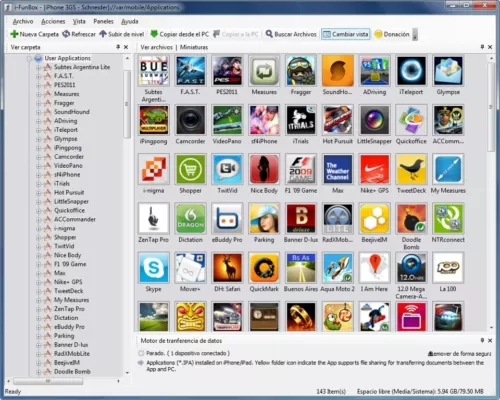
What is iFunBox 3.0?
iFunBox 3.0 is a Windows and macOS application designed to give users full access to the file system of their iOS devices. It works as an all-in-one file and app manager, allowing you to copy music, photos, videos, and documents between your iPhone, iPad, or iPod and your computer. Unlike iTunes, iFunBox provides a simple drag-and-drop interface, making file transfers much faster and more user-friendly.
Key Features of iFunBox 3.0
File Management: Browse and manage the file system of your iPhone or iPad.
App Installation: Install and back up apps (including .IPA files).
Media Transfer: Copy music, photos, and videos between your iOS device and PC/Mac.
Drag-and-Drop Interface: Simplifies file transfer without complex steps.
Backup and Restore: Safely back up data and restore it when needed.
Jailbreak Support: Unlock advanced features for jailbroken devices.
Portable and Lightweight: Small application size with fast performance.
System Requirements
Before installing iFunBox 3.0, check that your system meets the following requirements:
Operating System: Windows 7, 8, 10, 11 or macOS 10.10+
Processor: Intel/AMD CPU, 1 GHz or faster
RAM: 2 GB minimum
Storage: 100 MB free disk space
iTunes Installation: iTunes drivers may be required for device detection
How to Download and Install iFunBox 3.0
Visit the official iFunBox website or trusted software repository.
Download the installer for Windows or macOS.
Run the setup file and follow the installation steps.
Connect your iPhone or iPad using a USB cable.
Launch iFunBox 3.0 and start managing your device files.
Why Use iFunBox 3.0?
Unlike iTunes, which can feel restrictive and complicated, iFunBox gives users complete freedom over their iOS devices. It is especially useful for people who want to back up apps, transfer large amounts of data quickly, or manage files without relying on cloud services. Gamers can also use it to transfer saved data, while professionals may use it for quick access to documents and media.
Conclusion
iFunBox 3.0 is a reliable and user-friendly tool for managing files on iPhone, iPad, and iPod devices. By offering simple drag-and-drop transfers, app installation, and system file access, it provides far more flexibility than iTunes. Whether you are a casual iPhone user or a power user with advanced needs, iFunBox 3.0 can save you time and make managing your iOS device effortless. Download it today and enjoy complete control over your iPhone and iPad.
✔ Tested: This software was tested on Windows 10 & Windows 11 and works smoothly without issues.
Frequently Asked Questions
- Is this software free?
Yes, it can be downloaded and used for free. - Does it support Windows 11?
Yes, it works perfectly on Windows 10 and 11. - Is it safe to use?
Yes, the software was scanned and tested before publishing.
Last updated: January 2026