
What Is Clover 3.5.6?
Clover 3.5.6 is a lightweight utility designed to enhance the Windows File Explorer experience by adding a tabbed interface, much like the one used in Google Chrome. Instead of opening multiple File Explorer windows, users can now manage several folders in a single window with tabs — improving both efficiency and workflow.
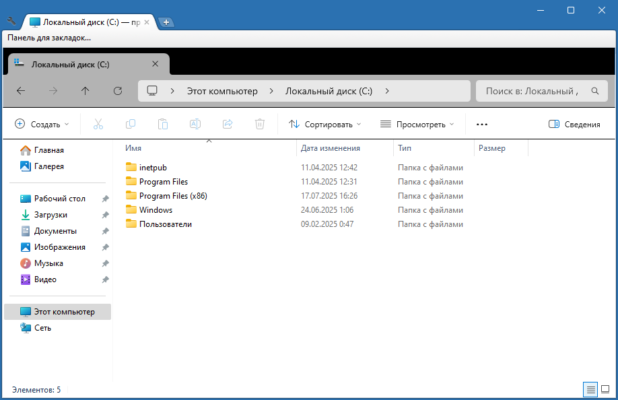
Key Features of Clover 3.5.6
💡 Chrome-Style Tabs for File Explorer
Clover integrates seamlessly into Windows Explorer, allowing users to open multiple folders as tabs within a single window.
📌 Bookmark Functionality
Clover supports a bookmarks bar, letting you quickly access your favorite folders with one click — just like bookmarking web pages in a browser.
🔄 Smooth Integration
The interface blends natively with Windows Explorer, meaning no learning curve or drastic UI changes.
⚙️ Lightweight & Fast
Clover is optimized for performance and doesn’t consume significant system resources.
Why Use Clover?
If you’re constantly opening and managing multiple folders while working, Clover can greatly reduce screen clutter. It simplifies navigation, minimizes the need for taskbar switching, and keeps everything organized.
System Requirements
OS: Windows 7 / 8 / 10 / 11
Architecture: 32-bit & 64-bit
Installation Size: Less than 10 MB
How to Install Clover 3.5.6
Download the latest version from the official source or trusted software directories.
Run the installer and follow the setup steps.
Open File Explorer — you’ll now see a Chrome-like tab bar at the top.
Conclusion
Clover 3.5.6 is a must-have tool for anyone who spends time organizing files in Windows. With its tabbed interface and bookmark support, it brings a modern, efficient workflow to the classic File Explorer.
✔ Tested: This software was tested on Windows 10 & Windows 11 and works smoothly without issues.
Frequently Asked Questions
- Is this software free?
Yes, it can be downloaded and used for free. - Does it support Windows 11?
Yes, it works perfectly on Windows 10 and 11. - Is it safe to use?
Yes, the software was scanned and tested before publishing.
Last updated: January 2026