
ShareX 18.0 is the latest evolution of the popular open-source Windows screen capture software. Known for being completely free and packed with professional-grade features, this update delivers a refreshed core engine, enhanced usability, and upgraded performance—making it a must-have for content creators, developers, designers, and everyday power users.
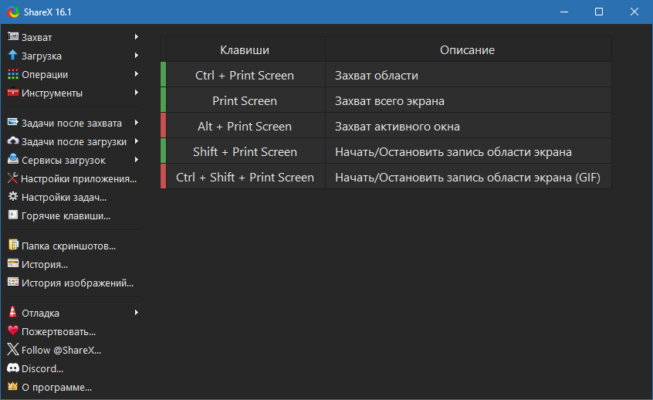
🔥 What’s New in ShareX 18.0
🆕 Migration to .NET 9.0
ShareX now runs on .NET 9.0 instead of the older .NET Framework 4.8.
No separate framework installation is needed—everything is bundled inside.
Requires Windows 10 (64-bit) or later.
The installer is now larger (around 100 MB) due to the built-in framework.
💾 Faster History with SQLite
History files are now stored in an SQLite database instead of JSON.
Faster loading and improved reliability.
On first launch, older history is automatically migrated to the new format.
🎞️ Real Video Thumbnails
Videos now show actual thumbnails in the history view, complete with a play icon.
Easier to identify recorded clips at a glance.
📷 QR Code Improvements
Added QR Scan Region hotkey for instant scanning.
New quick-access scan button.
Optional sound alert when a scan is complete.
🛠️ Improved Workflow Controls
Quick-action buttons in history: ⭐ Favorite, ✏️ Rename, 🗑️ Delete, and 🖼️ Edit.
Filters like “Only show images” and “Show stats” for organized browsing.
Updated UI for better navigation and easier access to tools.
⚙️ Core Features That Make ShareX Stand Out
📸 Advanced Screen Capture
Fullscreen, window, region, scrolling capture, and even GIF recording.
Configurable hotkeys for one-click captures.
🎥 Screen Recording & GIF Maker
Capture video in high quality.
Export in multiple formats.
Ideal for tutorials, presentations, or quick demos.
🖌️ Built-In Image Editor
Add text, arrows, highlights, blur effects, and shapes without leaving the app.
☁️ Direct Upload & Sharing
Upload images, videos, and files directly to cloud services or FTP.
Share instantly with copied URLs (optional).
🎨 Productivity Tools
Color picker, ruler, image effects, OCR text recognition, QR code creation, and more.
📋 System Requirements
OS: Windows 10 / 11 (64-bit)
RAM: 4 GB minimum recommended
Storage: ~200 MB for install + extra for captures
CPU: Dual-core or better for video recording
💡 Why Upgrade to ShareX 18.0?
Modern Performance: The .NET 9.0 upgrade makes it future-ready.
Better Media Management: Faster history, visual video previews.
Streamlined UI: Quicker access to your most used tools.
Still 100% Free: No ads, no paywalls, completely open source.
✅ Conclusion
ShareX 18.0 is more than just a screenshot tool—it’s a complete productivity suite for capturing, editing, and sharing visual content. Whether you’re a professional looking for advanced workflows or a casual user needing quick and reliable captures, ShareX remains one of the most powerful and flexible free tools available for Windows.
✔ Tested: This software was tested on Windows 10 & Windows 11 and works smoothly without issues.
Frequently Asked Questions
- Is this software free?
Yes, it can be downloaded and used for free. - Does it support Windows 11?
Yes, it works perfectly on Windows 10 and 11. - Is it safe to use?
Yes, the software was scanned and tested before publishing.
Last updated: January 2026