
Donemax Disk Clone Enterprise 3.0: The Ultimate Solution for Professional Disk Cloning & Migration 💼🖥️
When businesses need to migrate systems, clone drives, or create reliable backups, they require a tool built for reliability, speed, and enterprise-grade features. Donemax Disk Clone Enterprise 3.0 delivers a comprehensive solution for disk cloning, system backup, and SSD/HDD migration—designed specifically for IT departments, technicians, and organizations managing multiple machines.
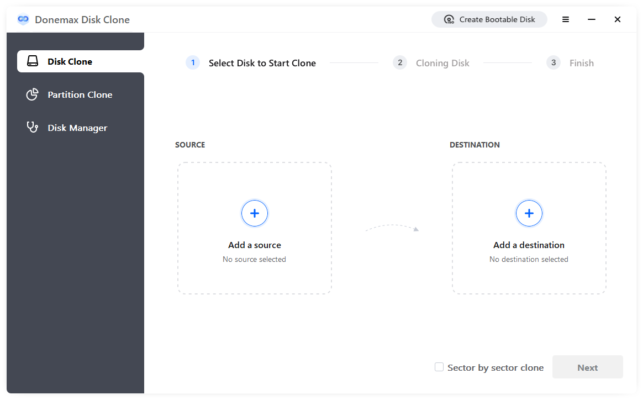
Whether you’re upgrading hardware, deploying systems, or securing critical data, Donemax Enterprise ensures seamless, secure, and scalable operations.
🎯 Why Choose Donemax Disk Clone Enterprise?
- ✅ Enterprise-grade stability – designed for critical business use
- ✅ Fast cloning with advanced algorithms
- ✅ SSD/HDD support – including NVMe and legacy drives
- ✅ System migration – transfer OS to new hardware without reinstalling
- ✅ Volume licensing – ideal for large deployments
Perfect for IT administrators, PC technicians, system builders, and businesses needing reliable disk management tools.
✨ Key Features of Version 3.0
💾 1. High-Speed Disk Cloning
- Clone entire disks or specific partitions
- Sector-by-sector or file-level cloning (faster)
- Intelligent copy – only used space is transferred
🔄 2. System Migration
- Migrate OS to SSD/HDD without reinstalling Windows
- Auto-resize partitions to fit new drive
- Bootable – cloned disk ready to use immediately
🔐 3. Secure Data Handling
- Encryption options for sensitive data
- Secure erase of source drives (DoD-compliant)
- No data loss during cloning process
📊 4. Advanced Management
- Batch cloning – clone one source to multiple targets
- Create disk images (backup) and restore later
- Verify clone integrity after completion
🖥️ 5. Cross-Hardware Compatibility
- Works with different drive sizes and brands
- Supports BIOS/UEFI systems
- Handles RAID arrays and virtual disks
🛠️ Ideal For:
- IT Departments: Deploy identical systems across fleets
- PC Technicians: Clone customer drives during upgrades
- System Administrators: Migrate servers or workstations
- Small Businesses: Secure backups and hardware upgrades
- Hardware Upgraders: Move OS from HDD to SSD effortlessly
💡 Tip: Use batch cloning to upgrade multiple employee PCs simultaneously.
🆚 Donemax vs. Built-in Windows Tools
Donemax Enterprise offers professional features with ease of use.
💡 Final Thoughts: Clone with Confidence
Donemax Disk Clone Enterprise 3.0 is the trusted choice for businesses that demand speed, security, and reliability in their disk management. Whether you’re upgrading hardware or backing up critical systems, it ensures zero downtime and zero data loss.
🔧 Clone. Migrate. Secure. Scale.
🌐 Official website: https://www.donemax.com (Note: Verify exact URL—this is the likely parent site)
💻 Windows only. Available in Standard and Enterprise editions.
✔ Tested: This software was tested on Windows 10 & Windows 11 and works smoothly without issues.
Frequently Asked Questions
- Is this software free?
Yes, it can be downloaded and used for free. - Does it support Windows 11?
Yes, it works perfectly on Windows 10 and 11. - Is it safe to use?
Yes, the software was scanned and tested before publishing.
Last updated: January 2026