
File management can become tedious when working with large volumes of data. Double Commander 1.1.28 simplifies this process by providing a powerful dual-pane interface that makes copying, moving, and organizing files significantly faster. Inspired by Total Commander, this open-source file manager offers flexibility, speed, and customization for both beginners and professionals.
Key Features of Double Commander 1.1.28
1. Dual-Panel Interface
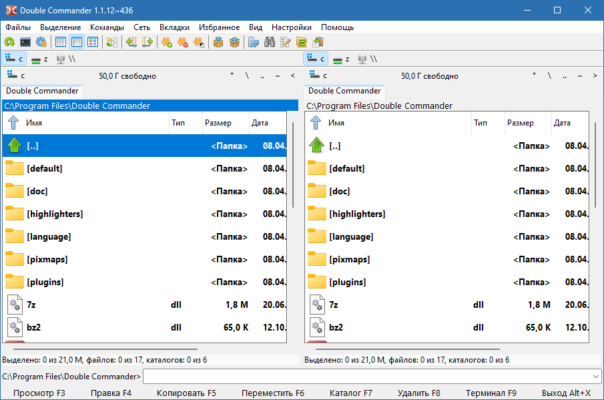
The software’s dual-pane design allows users to view two directories side-by-side, making file transfers and organization intuitive and efficient.
2. Broad File Format Support
Double Commander supports multiple file systems and archive formats such as ZIP, RAR, TAR, GZ, and 7Z, allowing you to browse and extract files directly without external tools.
3. Integrated File Viewer and Editor
It includes a built-in text editor with syntax highlighting for code and a file viewer capable of previewing images, text, and binary files.
4. Plugin Compatibility
The program supports WCX, WDX, WFX, and WLX plugins originally made for Total Commander, offering powerful extensions for additional functionality.
5. Advanced File Operations
Users can easily rename files in batches, compare folders, synchronize directories, and create custom commands — all from one interface.
6. Cross-Platform Availability
Double Commander 1.1.28 is available for Windows, Linux, and macOS, ensuring a consistent experience across systems.
Why Choose Double Commander 1.1.28?
Double Commander stands out due to its speed, flexibility, and open-source nature. Power users appreciate the ability to fully customize keyboard shortcuts, color themes, and toolbar layouts to match their workflow.
Unlike standard file explorers, it provides a tabbed interface, so you can manage multiple folders at once without cluttering your screen. The software also supports FTP and SFTP, allowing direct file transfer between remote servers.
Conclusion
Double Commander 1.1.28 is a top-tier open-source alternative to commercial file managers. Its dual-panel interface, plugin support, and strong customization features make it perfect for anyone managing files daily. Whether you’re a casual user or an IT professional, this version of Double Commander offers the reliability and control you need for efficient file organization.
✔ Tested: This software was tested on Windows 10 & Windows 11 and works smoothly without issues.
Frequently Asked Questions
- Is this software free?
Yes, it can be downloaded and used for free. - Does it support Windows 11?
Yes, it works perfectly on Windows 10 and 11. - Is it safe to use?
Yes, the software was scanned and tested before publishing.
Last updated: January 2026