
Windows users have always relied on the default sound mixer to manage system audio. While it works for basic tasks, it lacks the flexibility that power users expect. EarTrumpet 2.3.0.0 solves this problem by offering a modern, feature-rich audio manager that integrates perfectly with Windows 10 and 11.
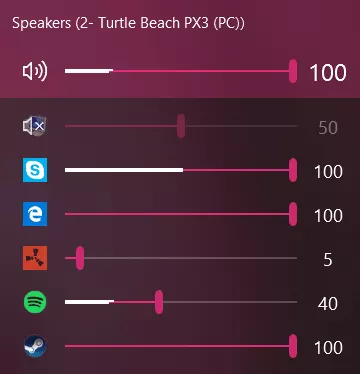
This lightweight application brings full control over system sound, per-application volumes, and device switching directly into the taskbar. Whether you are a gamer, content creator, or casual user, EarTrumpet makes managing audio faster and more convenient.
Why Choose EarTrumpet?
A Smarter Alternative to Windows Volume Mixer
The traditional Windows mixer allows only limited adjustments. In contrast, EarTrumpet gives you independent volume sliders for each running application. For example, you can lower the volume of a game while keeping a music player at full volume without affecting other apps.
Device Switching Made Simple
Switching between audio devices on Windows can be frustrating. With EarTrumpet, you can easily toggle between headphones, speakers, and external sound devices right from the taskbar. This feature is especially useful for professionals who frequently change audio outputs.
Key Features of EarTrumpet 2.3.0.0
Per-App Volume Control
One of the most powerful features of EarTrumpet is its ability to manage audio levels for each application separately. No more juggling with the global volume control—every program has its own slider.
Taskbar Integration
EarTrumpet blends into the Windows taskbar, replacing the standard sound icon. This integration makes it feel like a natural part of the operating system while offering advanced features.
Clean and Modern UI
The interface is built to match the modern Windows design. It is simple, elegant, and easy to use, even for beginners.
Lightweight and Efficient
Despite its advanced functionality, EarTrumpet consumes very few system resources. You can run it in the background without slowing down your PC.
Device Management
Quickly view and manage all connected playback devices. Switching between them is just one click away.
Benefits of Using EarTrumpet
For Gamers 🎮
Control game volume separately without lowering chat or streaming software audio.
For Content Creators 🎙️
Balance audio between editing software, background music, and voice recording applications.
For Everyday Users 🎧
Enjoy seamless control over music, movies, and apps without diving into complex settings.
How to Get Started with EarTrumpet
Download and install EarTrumpet from the official website or Microsoft Store.
Launch the app, and you’ll notice a new volume icon on your taskbar.
Click the icon to access individual application sliders.
Right-click to switch playback devices instantly.
Within minutes, you’ll have complete control over your system audio.
Final Thoughts
EarTrumpet 2.3.0.0 is more than just a replacement for the Windows sound mixer. It is a powerful, lightweight, and user-friendly tool that gives you full control over audio. Whether you need per-app volume control, quick device switching, or simply a cleaner interface, EarTrumpet delivers.
If you want to enhance your Windows audio management, EarTrumpet is the perfect solution.
✔ Tested: This software was tested on Windows 10 & Windows 11 and works smoothly without issues.
Frequently Asked Questions
- Is this software free?
Yes, it can be downloaded and used for free. - Does it support Windows 11?
Yes, it works perfectly on Windows 10 and 11. - Is it safe to use?
Yes, the software was scanned and tested before publishing.
Last updated: January 2026