
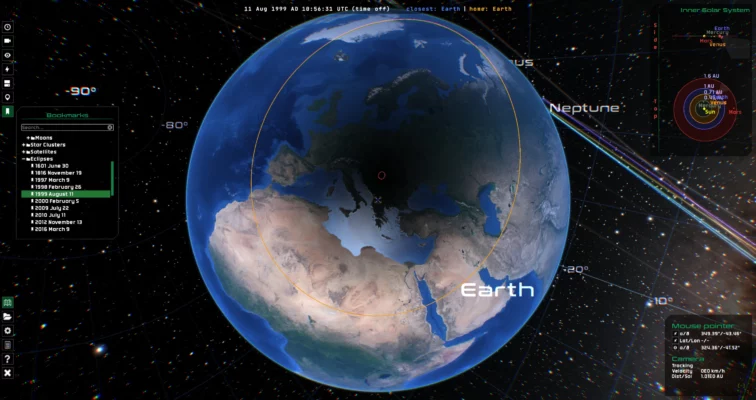
Gaia Sky 3.6.9-2 is an advanced, real-time 3D universe simulator developed by the European Space Agency (ESA). It allows users to explore the stars, galaxies, and exoplanets using real astronomical data—especially from the Gaia mission. This cross-platform tool is ideal for scientists, educators, students, and space enthusiasts.
🛰️ Key Features of Gaia Sky 3.6.9-2
⭐ 1. Real-Time 3D Visualization
Visualize stars, planets, nebulae, and galaxies with scientific accuracy based on Gaia DR3 data.
🪐 2. Explore the Milky Way & Beyond
Navigate through a realistic model of the Milky Way, zoom into star clusters, or view nearby exoplanet systems.
🎓 3. Educational and Research-Friendly
Gaia Sky includes measurement tools, scripting capabilities, and VR support, making it perfect for teaching and scientific demos.
🎮 4. Gamepad and VR Support
Control your journey through space using a game controller or virtual reality headset for an immersive experience.
🔁 5. Open Source and Cross-Platform
Completely free and open-source software available on Windows, macOS, and Linux.
🆕 What’s New in Version 3.6.9-2?
Improved rendering performance on low-end GPUs
Added new exoplanetary data sets
Bug fixes and stability enhancements
Updated Gaia EDR3 catalog support
💻 System Requirements
OS: Windows 10/11, macOS, or Linux
RAM: 4 GB minimum
GPU: OpenGL 3.3+ compatible graphics
Disk: 500 MB (additional for datasets)
📥 Download Gaia Sky 3.6.9-2
Visit the official site: https://zah.uni-heidelberg.de/gaia-sky
You can also find installers and source code on GitHub.
🌌 Who Should Use Gaia Sky?
Educators – Demonstrate real-time celestial mechanics and astronomy concepts
Researchers – Visualize astronomical datasets interactively
Students – Learn about space with hands-on exploration
Enthusiasts – Experience the universe in stunning 3D
✔ Tested: This software was tested on Windows 10 & Windows 11 and works smoothly without issues.
Frequently Asked Questions
- Is this software free?
Yes, it can be downloaded and used for free. - Does it support Windows 11?
Yes, it works perfectly on Windows 10 and 11. - Is it safe to use?
Yes, the software was scanned and tested before publishing.
Last updated: January 2026