Simple VHD Manager 1.5: Effortlessly Manage Virtual Hard Disks on Windows 🖥️📦
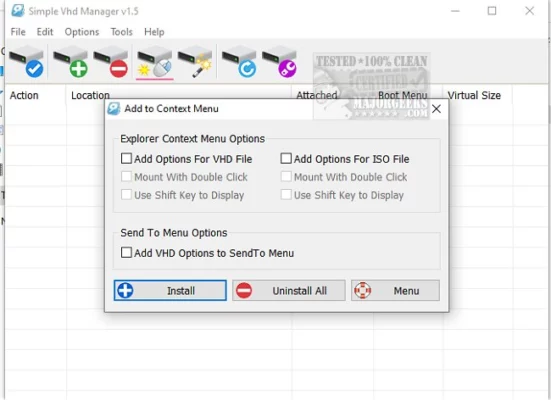
Working with Virtual Hard Disks (VHDs) in Windows shouldn’t require navigating complex command-line tools or heavy virtualization software. Simple VHD Manager 1.5 is a lightweight, free Windows utility designed to simplify the creation, attachment, and management of VHD and VHDX files directly from a user-friendly interface.
Whether you’re a system administrator, developer, or home user, this tool provides essential VHD management without the complexity.
🎯 Why Use Simple VHD Manager?
- ✅ Simple, intuitive interface – no command-line needed
- ✅ Create & manage VHD/VHDX files easily
- ✅ Attach & detach disks with one click
- ✅ Lightweight & portable – no installation required
- ✅ Free for personal & commercial use – no hidden costs
- ✅ No dependencies – runs on standard Windows features
Perfect for creating portable drives, backing up systems, or testing software in isolated environments.
✨ Key Features of Version 1.5
💾 1. Easy VHD Creation
- Create fixed-size or dynamic VHDs
- Choose VHD or VHDX format
- Set custom size and location
- NTFS or FAT32 file system support
🔌 2. Quick Attach & Detach
- Mount VHDs as virtual drives instantly
- Safely detach without data loss
- List all attached VHDs for easy management
- Check drive letters and status
🗂️ 3. File Management
- Browse existing VHD files
- View VHD properties (size, type, file system)
- Delete VHDs (with confirmation)
- Check disk space usage
⚙️ 4. User-Friendly Operation
- Drag-and-drop support for VHD files
- Clear status indicators (attached/detached)
- Simple, clean interface with minimal options
- Portable executable – runs from any location
🛠️ Ideal For:
- System Administrators: Manage virtual machines and disk images
- Developers: Create isolated environments for testing
- Home Users: Create portable storage or backup images
- Anyone: Needing a simple way to handle VHD files
💡 Tip: Use Simple VHD Manager to create a portable drive for carrying applications or documents securely.
🆚 Simple VHD Manager vs. Built-in Windows Tools
Simple VHD Manager provides the easiest and fastest way to manage VHDs without complexity.
💡 Final Thoughts: Manage Virtual Disks, Simply
Simple VHD Manager 1.5 proves that powerful tools don’t need to be complicated. By focusing on core VHD management tasks and delivering them through a clean, intuitive interface, it makes virtual disk management accessible and efficient for everyone.
💾 Create. Attach. Manage. Effortlessly.
🔗 Official download: https://www.simplevhdmanager.com (Note: Verify exact URL—this is a likely source for such tools)
💻 Compatible with Windows 11/10/8.1/8/7 (32-bit & 64-bit) – portable, no installation required.
✔ Tested: This software was tested on Windows 10 & Windows 11 and works smoothly without issues.
Frequently Asked Questions
- Is this software free?
Yes, it can be downloaded and used for free. - Does it support Windows 11?
Yes, it works perfectly on Windows 10 and 11. - Is it safe to use?
Yes, the software was scanned and tested before publishing.
Last updated: January 2026